
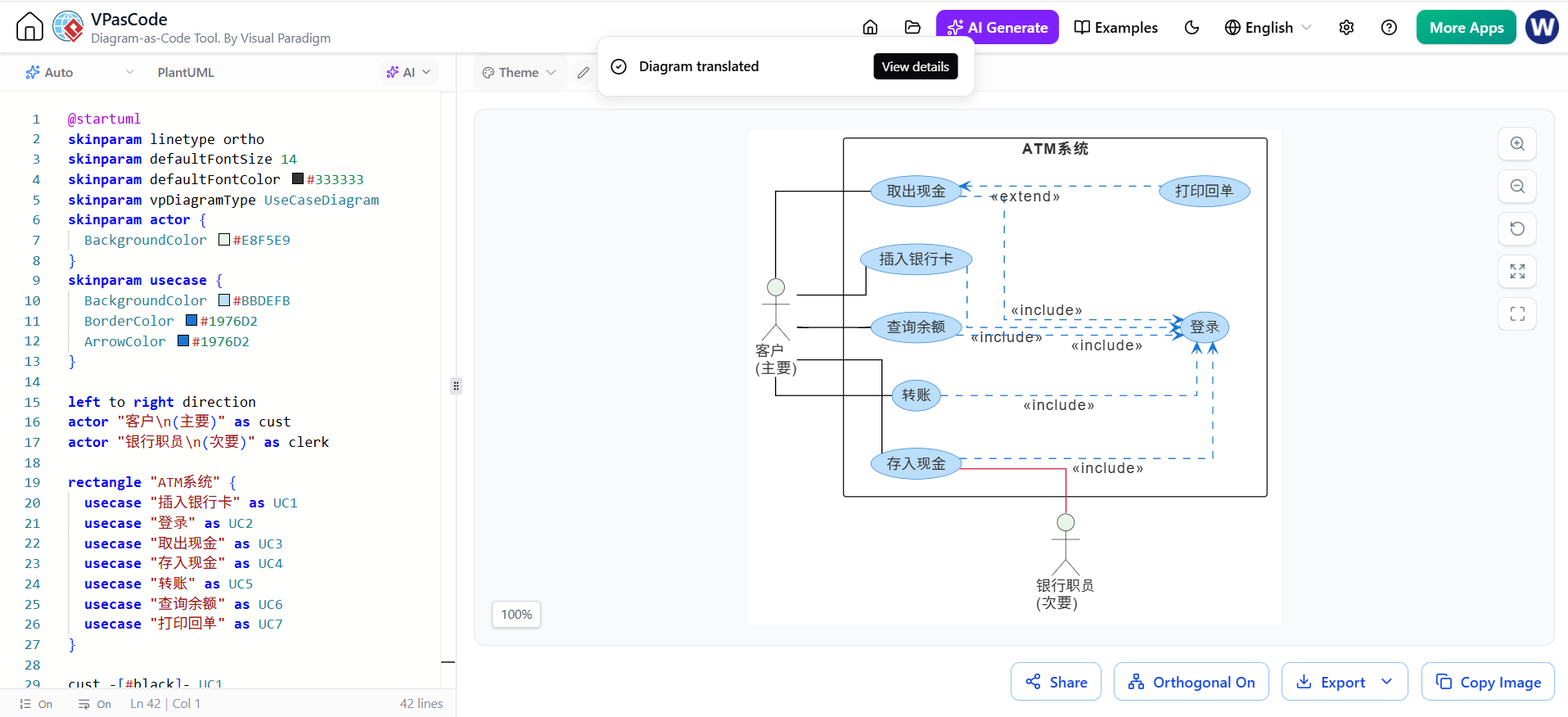
In the modern era of global software development, the ability to collaborate across linguistic boundaries is paramount. Visual Paradigm’s VPasCode tool revolutionizes this workflow by integrating AI-driven translation directly into the diagramming process. This tutorial explores how VPasCode leverages AI to translate Use Case diagrams while preserving the underlying PlantUML syntax, ensuring that your models remain functional regardless of the display language.
Understanding the VPasCode Architecture
The core philosophy behind VPasCode is “Diagram-as-Code.” Unlike traditional drag-and-drop tools where diagrams are binary blobs or proprietary files, VPasCode treats diagrams as text files that can be version-controlled, diffed, and edited. The interface shown in our context provides a split-view experience:
- Left Panel (Editor): This is where the source code lives. It uses a specialized subset of PlantUML syntax to define actors, use cases, and system boundaries.
- Right Panel (Renderer): This is the visual representation. As you type code, the engine parses it and renders the diagram in real-time.
The most striking feature of this architecture is the AI Translation Filter. This tool is not a simple find-and-replace utility. It is “domain-aware,” meaning it understands the difference between a label that needs to be translated (like “Insert Card”) and a keyword that must remain in English (like “actor” or “include”).
Step-by-Step: Analyzing the Syntax
Let’s break down the code snippet provided in the screenshot to understand how the AI translates the visual elements while maintaining logic.
1. Skinparam and Styling
Before defining the logic, the code sets the visual theme. The skinparam directives control colors, fonts, and shapes. Notice that these lines remain unchanged in the translated version. The AI knows that skinparam defaultFontColor is a command, not a label.
skinparam linetype ortho
skinparam defaultFontSize 14
skinparam defaultFontColor #333333
skinparam vpDiagramType UseCaseDiagram
skinparam actor {
  BackgroundColor #E8F5E9
}
skinparam usecase {
  BackgroundColor #BBDEFB
  BorderColor #1976D2
  ArrowColor #1976D2
}
2. Defining Actors and Use Cases
The semantic power of the tool lies in the actor definitions. In the code, you might see:
actor "客户
(主要)" as cust
Here, the AI identifies the string inside the quotes as the display text. When translated, it becomes “Customer (Primary)” or similar, but the variable name cust remains constant. This is crucial because other parts of the code reference this variable (e.g., cust -[>key] UC1).
3. System Boundary and Relationships
The rectangle block defines the system boundary. Inside, we see a list of use cases. The AI translates the names of these use cases (like “存款” to “Deposit”) but keeps the relationship operators intact.
rectangle "ATM系统" {
  usecase "插入银行卡" as UC1
  usecase "登录" as UC2
  usecase "取出现金" as UC3
  usecase "存入现金" as UC4
  usecase "转账" as UC5
  usecase "查询余额" as UC6
  usecase "打印回单" as UC7
}
The relationships are defined using standard PlantUML syntax like <<include>> and <<extend>>. The AI ensures that these keywords are never translated, preserving the logical structure of the model.
The Importance of Semantic Retention
Why is it critical that the AI only translates text inside visual blocks? In software modeling, ambiguity is the enemy. If the tool translated the word “include” to a foreign language, the diagram engine would fail to parse the relationship between the use cases.
By isolating the translation to the rendered text strings only, VPasCode achieves two goals:
- Global Collaboration: Developers from different regions can view and edit the diagrams in their native language.
- Technical Integrity: The diagram remains a valid PlantUML file. You can copy the code, run it on a server, or import it into a CI/CD pipeline without worrying about language-specific syntax errors.
Conclusion
VPasCode represents a significant leap in how we approach documentation in international teams. It bridges the gap between the need for clear, localized communication and the rigid requirements of technical syntax. By using AI to handle the translation while strictly adhering to the structural rules of PlantUML, it ensures that your architectural diagrams are both beautiful and bug-free.