
In the evolving landscape of software architecture, the gap between high-level conversational design and low-level, syntax-perfect modeling is being closed by Visual Paradigm’s innovative integration. This tutorial explores the critical transition point where a conversational AI generates a system design, and the VPasCode Bridge transforms that conversational output into an editable, executable diagram.
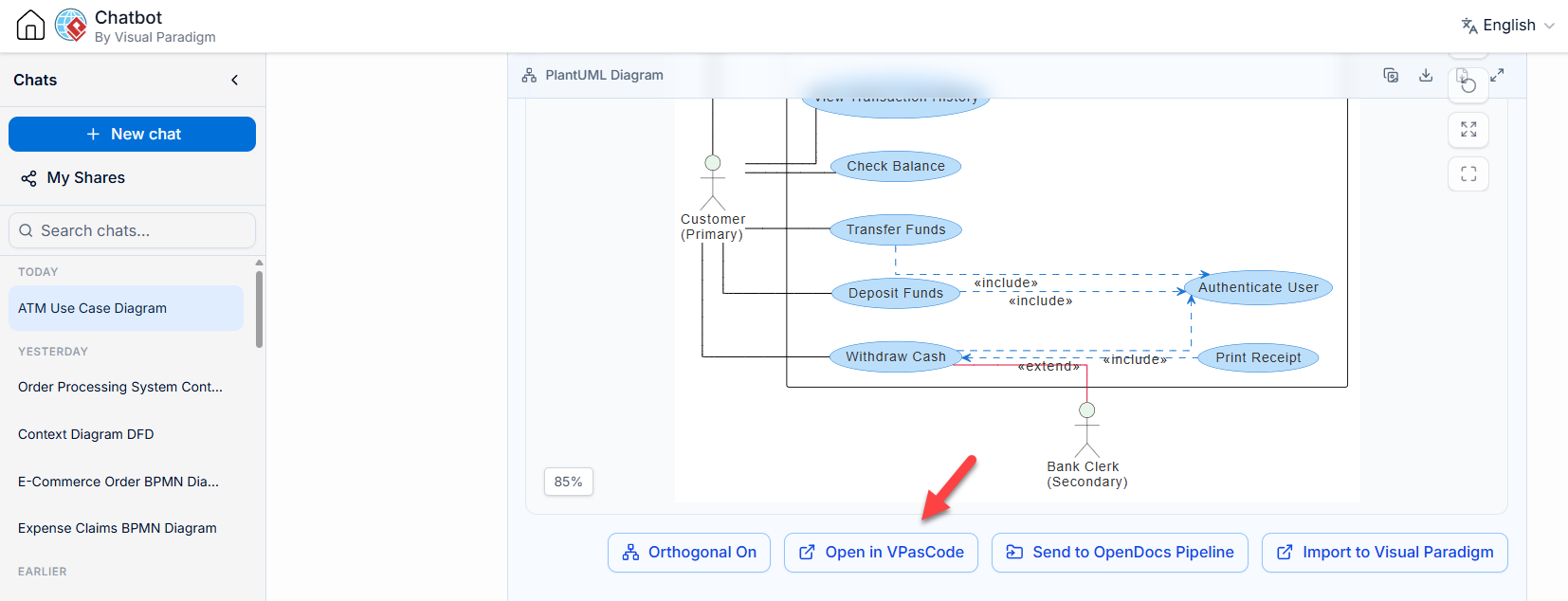
As illustrated in the interface screenshot, the workflow moves from a “Chat” environment to a specialized “VPasCode” workspace. This process ensures that the creative freedom of a chatbot is preserved while gaining the technical precision required for complex engineering tasks like UML Use Case diagrams.
1. The Conceptual Bridge: From Chat to Canvas
The architecture of this system relies on a dedicated pipeline known as the VPasCode Bridge. It is not merely a “copy and paste” function; it is a contextual translation engine.
- The Source (Chatbot): The AI operates within a conversational context. Here, the user defines system requirements, actors, and behaviors through natural language. The output is often a text-based representation (such as PlantUML) that is valid but static.
- The Target (VPasCode): This is the destination workspace. VPasCode acts as a “Code-as-Diagram” environment. It is designed for precision editing, debugging, and micro-managing the structural logic of the model.
- The Bridge: When the user clicks the Open in VPasCode button (highlighted in the interface), the structured architecture script is pushed directly to this workspace.
Why This Integration Matters
This workflow combines the exploratory freedom of AI chat with the precision of a dedicated modeling environment. Instead of manually re-typing code or fighting with syntax errors in a new tool, the architect simply bridges the gap. The cognitive load associated with context switching and grammar management is eliminated.
2. Deep Dive: Analyzing the ATM Use Case Model
The screenshot displays a classic ATM Use Case Diagram generated via this workflow. Let’s analyze the specific modeling elements and logic present in this diagram to understand what is being rendered in the VPasCode editor.
Actors and Roles
The diagram features two distinct actors, each with a specific role in the system:
- Customer (Primary): Represented by the stick figure on the left. This actor initiates the core transactions of the system.
- Bank Clerk (Secondary): Represented by the stick figure on the right. This actor handles specific, less frequent interactions, such as printing receipts.
Core Use Cases
The system capabilities are represented by ovals. The primary interactions include:
- Check Balance: A standard inquiry.
- Transfer Funds: A complex transaction involving moving money.
- Deposit Funds: Adding value to the account.
- Withdraw Cash: The most common banking operation.
- View Transaction History: Auditing past activities.
Relationship Logic: Include vs. Extend
The diagram demonstrates sophisticated modeling logic through directed relationships:
A. The «include» Relationship
Notice the dashed arrows labeled <<include>> pointing toward the Authenticate User use case. This signifies a mandatory dependency.
- Logic: For any action (like Deposit Funds or Withdraw Cash) to occur, the system must execute the “Authenticate User” step first.
- Benefit: This prevents code duplication. If the authentication logic changes, it only needs to be updated in one place.
B. The «extend» Relationship
Observe the red dashed arrow labeled <<extend>> originating from Print Receipt and pointing to Withdraw Cash.
- Logic: This is an optional behavior. The “Withdraw Cash” process runs normally without printing a receipt. However, under specific conditions (triggered by the “Bank Clerk” or user preference), the “Print Receipt” behavior extends the main flow.
- Benefit: This keeps the primary use case logic clean and separates optional features from the core flow.
3. The VPasCode Advantage: “Code as Diagram”
Once the diagram is moved to the VPasCode workspace, the workflow shifts from “designing” to “engineering.” The interface shown allows for “micro-editing.”
Key Technical Features
- Debugging: If the generated PlantUML has a syntax error, the VPasCode environment provides immediate feedback. The AI can then fix the code directly within the editor.
- Localization: The text mentions that the system supports global teams. The AI utilities can translate documentation or labels directly within the editor, ensuring consistency across languages.
- Refactoring: Unlike a static image, the VPasCode view allows you to modify the underlying code to change the layout (e.g., orthogonal layout settings) without losing the semantic meaning of the diagram.
The ability to edit the code directly (often referred to as the “DaC” or Diagram-as-Code approach) ensures that the diagram remains synchronized with the codebase, a critical requirement for modern software engineering.
Conclusion
The integration of the AI Chatbot with the VPasCode Bridge represents a significant leap forward in modeling efficiency. By unifying the “chat” phase of brainstorming with the “edit” phase of precision engineering, Visual Paradigm allows architects to focus on system design rather than tool mechanics. Whether you are generating a new architecture from scratch or fixing a stubborn PlantUML error, this unified approach ensures that your documentation is both fast to create and accurate to maintain.