
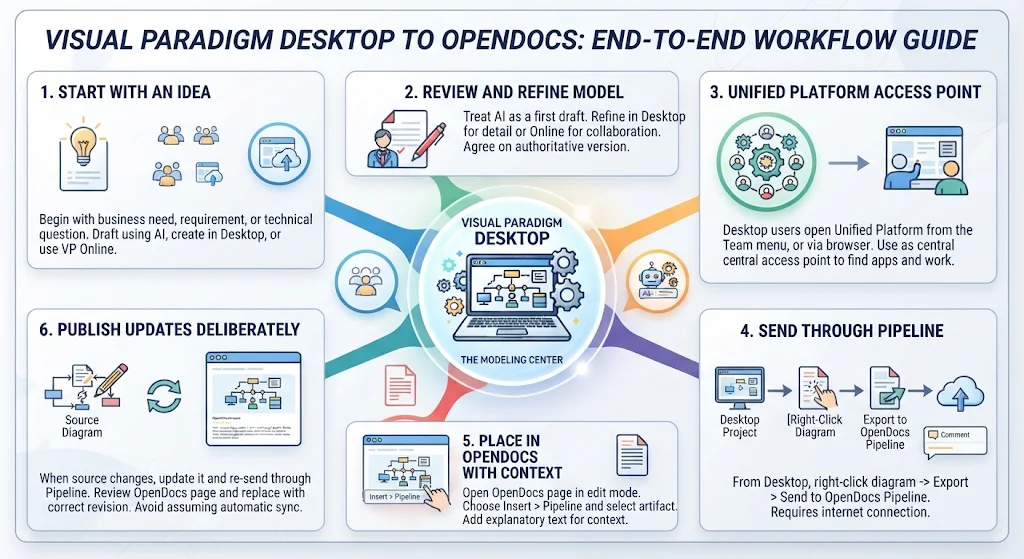
In the modern landscape of software engineering and enterprise architecture, the gap between the “modeler” and the “stakeholder” is often bridged by a disconnect in tooling. How does a complex diagram created in a heavy-duty desktop client end up in a readable, searchable documentation portal? Visual Paradigm offers a sophisticated ecosystem designed to solve this, moving beyond simple file storage to a managed workflow.
This tutorial explores the architectural logic behind the Visual Paradigm Desktop to OpenDocs workflow. We will dissect how the Unified Platform acts as the central nervous system, how the Pipeline facilitates the “handoff” of artifacts, and how teams can leverage AI for drafting without sacrificing architectural integrity.
1. The Architectural Foundation: Where Models Live
Before discussing the workflow, it is crucial to understand the distinct roles of the tools involved. Confusion here often leads to “version chaos,” where stakeholders are looking at outdated diagrams.
Visual Paradigm Desktop: The Modeling Engine
Think of Visual Paradigm Desktop as the engineering workbench. It is a robust environment designed for detailed modeling, ongoing project maintenance, and complex engineering capabilities. This is where the “single source of truth” for your diagrams is typically created. If you are dealing with deep UML specifications, complex data modeling, or rigorous engineering standards, this is your primary workspace.
VP Online: The Collaborative Canvas
VP Online serves a different, complementary purpose. It is a browser-based diagramming tool that benefits from web access. It is particularly effective when the requirement is rapid collaboration, quick edits, or when the audience needs to interact with the diagram without installing software. It is the “lightweight” counterpart to the Desktop’s heavy lifting.
The Unified Platform: The Command Center
Imagine a dashboard that organizes all your apps and artifacts. This is the Unified Platform. It acts as a central workspace for discovering applications and accessing artifacts across the ecosystem. It does not replace the individual tools (Desktop or Online) but rather organizes access to them. It ensures that users know where to find the tools they need without needing to memorize a dozen different URLs or login procedures.
2. The Workflow: A Step-by-Step Architecture
The transition from a raw idea to a published, contextualized document follows a logical “handoff” process. This is not an automatic, magical synchronization; it is a deliberate engineering workflow.
Phase 1: Conception and Drafting
The process begins with a business need, user requirement, or technical question. Today, this phase is often accelerated by AI tools. AI can be used to draft diagrams or explore ideas from prompts. However, a critical architectural rule applies here: Treat AI output as a first draft, not an approved design.
Whether you use AI, create directly in Desktop, or use VP Online, you must keep relevant requirements and notes with the project. This context is vital for reviewers to understand the intent of the diagram.
Phase 2: Review and Refinement
Once the draft exists, it must be treated as a model in progress. The goal is to check that the diagram reflects the requirements, uses consistent terminology, and includes important relationships and flows.
- Refinement in Desktop: If the work requires detailed modeling and continued project maintenance, the diagram should be refined in Desktop.
- Refinement in Online: If the team needs collaborative browser-based editing, VP Online is the better fit.
Crucial Step: Agree on which version is authoritative. Avoid treating several exported copies as equally current. Designate the source model (e.g., in a specific Desktop project or online artifact) as the one that governs the truth.
3. The Pipeline: The Bridge Between Tools
The most critical component in this architecture is the Pipeline. It serves as the transfer route for supported artifacts between Visual Paradigm tools. It is the mechanism that moves a diagram from the “creation zone” (Desktop) to the “consumption zone” (OpenDocs).
How the Pipeline Works
The Pipeline is not a storage locker; it is a transfer route. When you are ready to move a diagram from Desktop to OpenDocs, you utilize the Desktop-to-OpenDocs workflow. This process requires an internet connection and is strictly managed to ensure the receiving system gets the correct version of the artifact.
Executing the Transfer
To send an approved diagram through the Pipeline, follow this architectural procedure:
- Locate the Source: Open the project and diagram in Visual Paradigm Desktop.
- Initiate Export: Right-click the diagram and choose Export > Send to OpenDocs Pipeline.
- Persist Changes: Save the project if prompted to ensure the artifact is in its latest state.
- Contextualize: Add an optional comment that identifies the artifact’s purpose or revision. This metadata is vital for the downstream consumer.
- Confirm Transfer: Confirm the action. The diagram is now sent to the cloud-based Pipeline for use in OpenDocs.
4. OpenDocs: Contextual Consumption
The destination of this workflow is OpenDocs. This is not merely a place to view images; it is a place to combine diagrams with explanatory text and project documentation.
Placing the Diagram
To place a diagram in OpenDocs with proper context:
- Open or create the relevant OpenDocs page and enter Edit Mode.
- Place your cursor where the diagram belongs.
- Choose Insert > Pipeline and select the artifact you just sent.
The Importance of Context
A diagram is often difficult to interpret without a guide. Once the artifact is embedded, you must add text that explains the diagram’s purpose, scope, assumptions, and any decisions readers need to understand. This ensures that the diagram is easier to use, particularly for requirements documents, architecture references, and onboarding materials.
5. Maintenance and Governance
One of the most common pitfalls in modeling is assuming that updating a diagram in the source tool automatically updates it everywhere. The Visual Paradigm ecosystem operates on a “managed handoff” model, not necessarily a continuous, automatic two-way sync among every component.
Publishing Updates Deliberately
When the source diagram changes, you must follow a deliberate update process:
- Update the Source: Make the necessary changes in the tool where the model is maintained (e.g., Desktop).
- Re-Transfer: Send the revised artifact through the Pipeline again. This overwrites or updates the version in the pipeline.
- Review the Document: Go to the OpenDocs page and replace the embedded artifact with the appropriate revision.
Always review the page after an update to ensure the diagram and its accompanying explanation still agree. Do not assume that editing the Desktop diagram automatically changes every copy or document that uses it.
Summary: The Connected Workflow
The typical workflow for a Visual Paradigm team can be summarized as:
AI or Team Input → Desktop or VP Online → Pipeline Artifact → OpenDocs Page → Team Review and SharingThis architecture provides a robust framework for managing the lifecycle of software models. By using AI for drafts, maintaining a clearly identified source model, sending reviewed artifacts through the Pipeline, and placing them in OpenDocs with sufficient explanation, teams can bridge the gap between technical modeling and business documentation. The productivity benefit comes from clear ownership and deliberate handoffs, ensuring that when teams agree on where work lives and how revisions are published, the ecosystem makes models easier to find, maintain, and understand.