
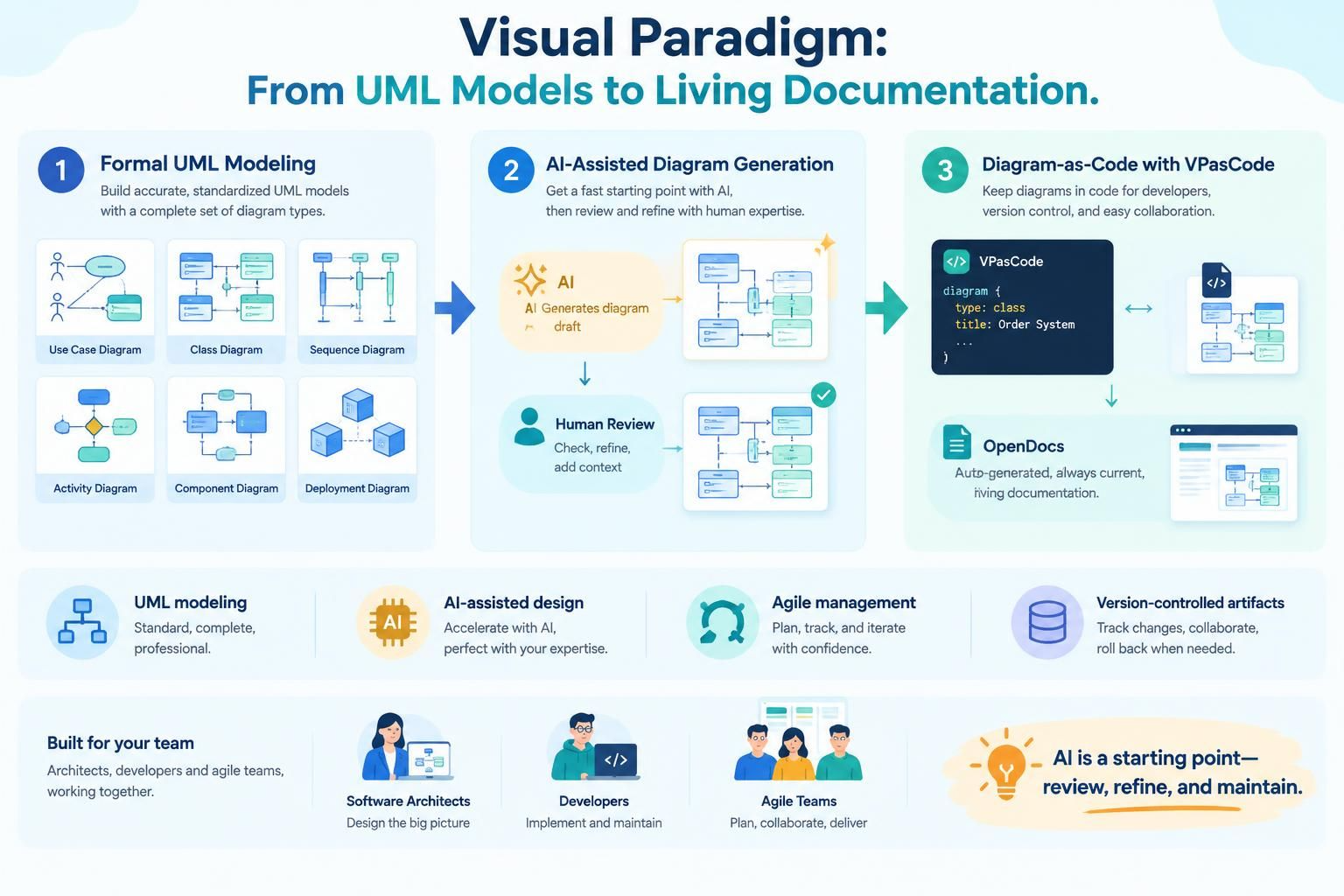
For decades, the Software Architect has faced a dilemma: the UML specification is rigorous and comprehensive, but the tools are often clunky, expensive, and disconnected from the reality of modern Agile development. Many professionals find themselves paralyzed by the sheer “size” of UML or overwhelmed by the learning curve required to master it. This tutorial recontextualizes that struggle by introducing a new workflow. We will explore how to transform Visual Paradigm from a static drawing tool into a dynamic, AI-accelerated engine that bridges the gap between high-level modeling and agile execution.
1. The Paradigm Shift: From Static Drawing to Living Documentation
The traditional approach to UML modeling involves drawing a diagram, exporting it as a PNG, and pasting it into a Word document or Confluence page. The moment you save that file, it becomes “dead.” Any change in the source code or the design requires you to redraw the diagram manually. This disconnect is why many teams abandon UML entirely.
Visual Paradigm, however, has evolved into an integrated ecosystem. Instead of isolated images, the platform treats diagrams as views into a shared, underlying model. This concept is the cornerstone of “Living Documentation.” When you update a class in the model repository, it automatically propagates to your sequence diagrams, activity flows, and documentation pages.
This shift eliminates the “export-stale-screenshot” problem. It allows teams to maintain a single source of truth where the visual representation of the system is always synchronized with the underlying architectural logic.
2. AI as a Co-Pilot: Overcoming the Learning Curve
One of the primary barriers to entry for UML is the syntax and the logical overhead. “How do I structure this sequence diagram?” or “What is the correct notation for this state transition?” can stall a project. Visual Paradigm addresses this by integrating Generative AI directly into the workflow, acting as a co-pilot rather than just a drawing assistant.
2.1 From Natural Language to Structural Logic
The AI chatbot feature allows you to bypass the initial drafting phase. Instead of manually placing boxes and arrows, you can describe the system’s behavior in plain English. The AI interprets this text and generates a structured UML draft. For instance, describing a “user login sequence” results in a sequence diagram with lifelines and messages pre-positioned.
This is particularly powerful for Business Analysts who may not be experts in UML notation but understand the requirements. They can translate requirement text directly into model elements, allowing the AI to handle the layout and relationship detection.
2.2 AI-Assisted Code Correction
For developers working with “Diagram-as-Code” tools like PlantUML or Mermaid, syntax errors are a common friction point. The platform flags these errors with specific line numbers and offers an “Fix with AI” button. This reduces the debugging time associated with diagram code, allowing the developer to focus on the logic rather than the syntax.
3. Diagram-as-Code: The Developer’s Best Friend
While drag-and-drop interfaces are intuitive, they are often insufficient for version control and collaborative engineering. Visual Paradigm embraces the “Diagram-as-Code” philosophy through its VPasCode environment. This tool allows developers to write diagrams using code, much like they write application software.
3.1 Why VPasCode Matters
VPasCode supports multiple engines, including PlantUML, Mermaid, Graphviz, and D2. This flexibility means developers can choose the syntax they are most comfortable with. The editor provides real-time previewing, meaning you see the diagram render instantly as you type.
This approach enables true version control. By storing diagrams in Git alongside your application code, architecture changes become reviewable via diff and reversible if a design decision goes wrong. This bridges the gap between the “Design” phase and the “Implementation” phase, ensuring that the code and the model remain aligned.
4. Managing Agile Projects with UML
Agile methodologies often emphasize working software over comprehensive documentation. However, “working software” requires a clear architecture. Visual Paradigm integrates UML modeling with Agile management tools, allowing teams to plan, track, and iterate with confidence.
Instead of siloing your architecture in one tool and your backlog in another, you can use the same platform to:
- User Story Mapping: Visualize the flow of user interactions.
- Burndown Charts: Track sprint progress alongside architectural blockers.
- Scrum Backlogs: Link requirements directly to use case diagrams.
This integration ensures that the architectural decisions made during the design phase are visible to the Agile team, preventing the “architecture drift” that often occurs when design and development are separated.
5. Practical Workflow: The AI + VPasCode + OpenDocs Pipeline
To get the most out of this ecosystem, teams should adopt a specific workflow that leverages the strengths of each component:
- Prompt the AI: Start with a natural language description of the system or a specific diagram. Let the AI generate the initial logic and structure.
- Review in VPasCode: Open the generated code in the VPasCode editor. Here, you can refine the styling, add missing relationships, and fix logical gaps using the live preview.
- Publish to OpenDocs: Once the diagram is finalized, publish it to OpenDocs. This creates a living document where the diagram is embedded and automatically updates whenever the source code changes.
This pipeline ensures that documentation is never an afterthought. It transforms the diagram from a static image into a maintained, version-controlled artifact.
6. Addressing the “Too Big” Myth
It is a common misconception that Visual Paradigm is too complex for small teams or simple projects. While the platform is feature-rich, it is designed to be scalable. For those just starting, the Community Edition provides access to all UML diagram types, allowing teams to assess the fit before committing to a paid license.
The key is to treat AI as a starting point rather than a finished product. By using the AI to handle the heavy lifting of syntax and layout, and then refining the logic through code, even small teams can achieve a level of architectural rigor that was previously reserved for enterprise-scale projects.