
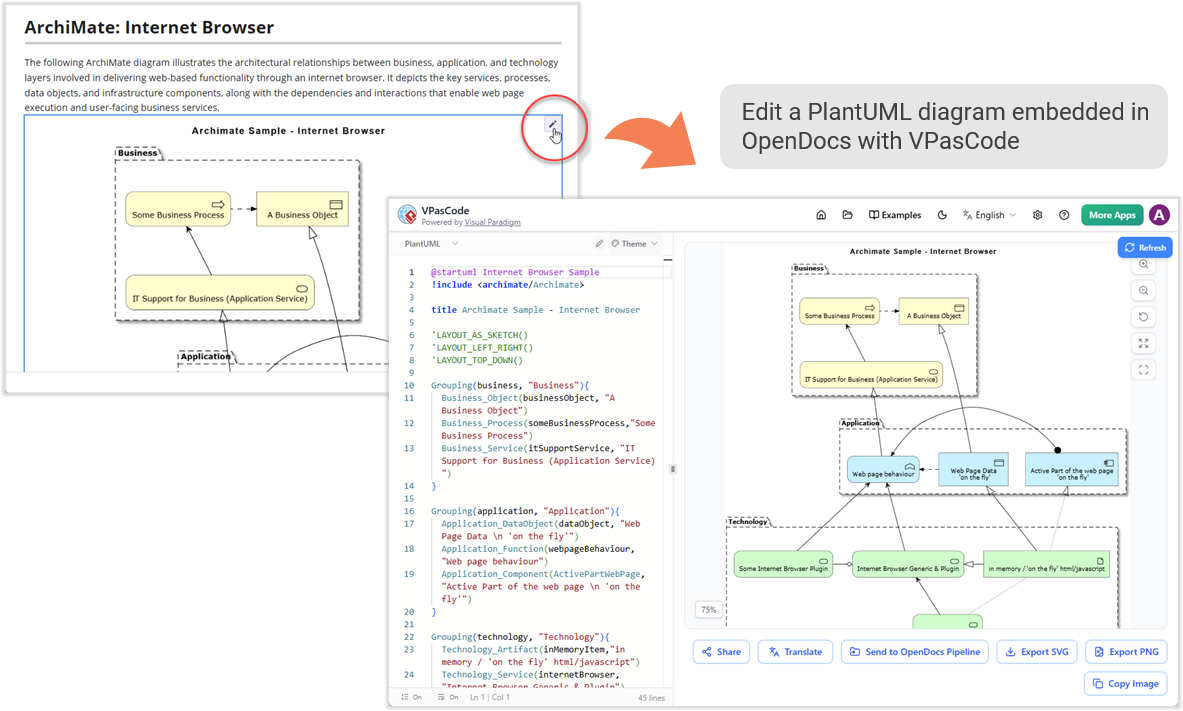
In the modern enterprise, understanding the complex relationship between business goals, the software applications that support them, and the underlying technology infrastructure is critical. Visual Paradigm’s OpenDocs, powered by the AI-driven VPasCode engine, offers a sophisticated approach to visualizing these connections using the ArchiMate modeling language.
This tutorial explores how to construct an Internet Browser Architecture Diagram. We will move from a high-level business view down to the specific technology artifacts, demonstrating how code-driven modeling allows for precise, layered architectural documentation.
Understanding the Architecture Layers
Before writing any code, it is essential to grasp the conceptual layers we are modeling. ArchiMate organizes architecture into three primary domains:
- Business Layer: Represents the highest level of abstraction, including business processes, actors, and business objects. This answers “What do we do?”
- Application Layer: Represents the software systems that support the business. This includes application components, functions, and data objects. This answers “How do we do it with software?”
- Technology Layer: Represents the physical and logical infrastructure that hosts the applications. This includes nodes, devices, and software instances. This answers “What hardware supports us?”
The diagram below illustrates how these layers interact to deliver a web-based service. The key to this model is the Realization relationship, where a lower layer provides the means for the layer above it to function.
Step-by-Step Modeling with VPasCode
Using the VPasCode interface, we can generate this architecture by defining the elements and their relationships in a structured text format. This method ensures that the diagram is reproducible and easily updated.
1. Setting the Stage: Imports and Layout
First, we initialize the diagram by including the ArchiMate standard library and defining the visual layout. We use the @startuml directive and the include statement to ensure all element definitions are recognized.
@startuml Internet Browser Sample
!include
title Archimate Sample - Internet Browser

'LAYOUT_AS_SKETCH()
'LAYOUT_LEFT_RIGHT()
'LAYOUT_TOP_DOWN()
2. Modeling the Business Layer
We begin with the “Business” package. Here, we define a generic BusinessProcess and an ApplicationService (which acts as a bridge between business and application). We then group these elements to organize the visual space.
Grouping(business, "Business"){
  Business_Object(businessObject, "A Business Object")
  Business_Process(someBusinessProcess, "Some Business Process")
  Business_Service(itSupportService, "IT Support for Business (Application Service)")
}
3. Modeling the Application Layer
Next, we move to the “Application” layer. This is where the functional logic resides. We define an ApplicationDataObject (like “Web Page Data”), an ApplicationFunction (like “Web Page Behaviour”), and an ApplicationComponent (the browser itself).
Grouping(application, "Application"){
  Application_DataObject(dataObject, "Web Page Data
 on the fly")
  Application_Function(webpageBehaviour, "Web Page Behaviour")
  Application_Component(activePartWebPage, "Active Part of the web page
 on the fly")
}
4. Modeling the Technology Layer
Finally, we define the “Technology” layer. This includes the TechnologyArtifact (the actual HTML/JavaScript code), the TechnologyComponent (the generic browser), and the TechnologyNode (the plugin).
Grouping(technology, "Technology"){
  Technology_Artifact(inMemoryItem, "In memory / 'on the fly' html/javascript")
  Technology_Service(internetBrowser, "Internet Browser Generic & Plugin")
  Technology_Component(someInternetBrowserPlugin, "Some Internet Browser Plugin")
}
5. Defining the Connections
The magic of ArchiMate lies in the relationships. We define how the layers interact using specific relationship types:
- Access: The browser accesses the data.
- Serves: The application serves the business process.
- Realization: The technology realizes the application component.
someInternetBrowserPlugin -right-> internetBrowser
internetBrowser -right-> activePartWebPage
activePartWebPage -right-> dataObject
dataObject -down-> webpageBehaviour
webpageBehaviour -left-> itSupportService
itSupportService -up-> someBusinessProcess
itSupportService -up-> businessObject

someBusinessProcess -right-> businessObject
someBusinessProcess -down-> someInternetBrowserPlugin
itSupportService -up-> businessObject
Visualizing the Result
When the code is processed by the VPasCode engine, it renders a comprehensive view. Notice how the “Technology” layer (green) supports the “Application” layer (blue), which in turn supports the “Business” layer (yellow). The arrows indicate the flow of value and execution.
Conclusion
By leveraging VPasCode, teams can rapidly iterate on architectural models. Instead of manually dragging and dropping shapes, architects can define the structural intent via code, ensuring that the business logic is accurately reflected in the underlying technology stack.