
In the realm of software engineering and business process modeling, the gap between a high-level concept and a documented system architecture is often where productivity is lost. Historically, professionals had to toggle between mind maps, documentation tools, and diagramming software. However, the evolution of Visual Paradigm VPasCode represents a paradigm shift toward a unified “diagram-as-code” workflow, recently enhanced by a strategic consolidation of its Artificial Intelligence capabilities.
This tutorial explores how the latest VPasCode update integrates AI directly into the core modeling experience, transforming the interface from a passive drawing tool into an active architectural assistant. We will examine the “AI Tools” menu, the logic behind the code-based generation, and how this unification accelerates the design process for product managers, architects, and developers.
The Shift to Unified AI Workflows
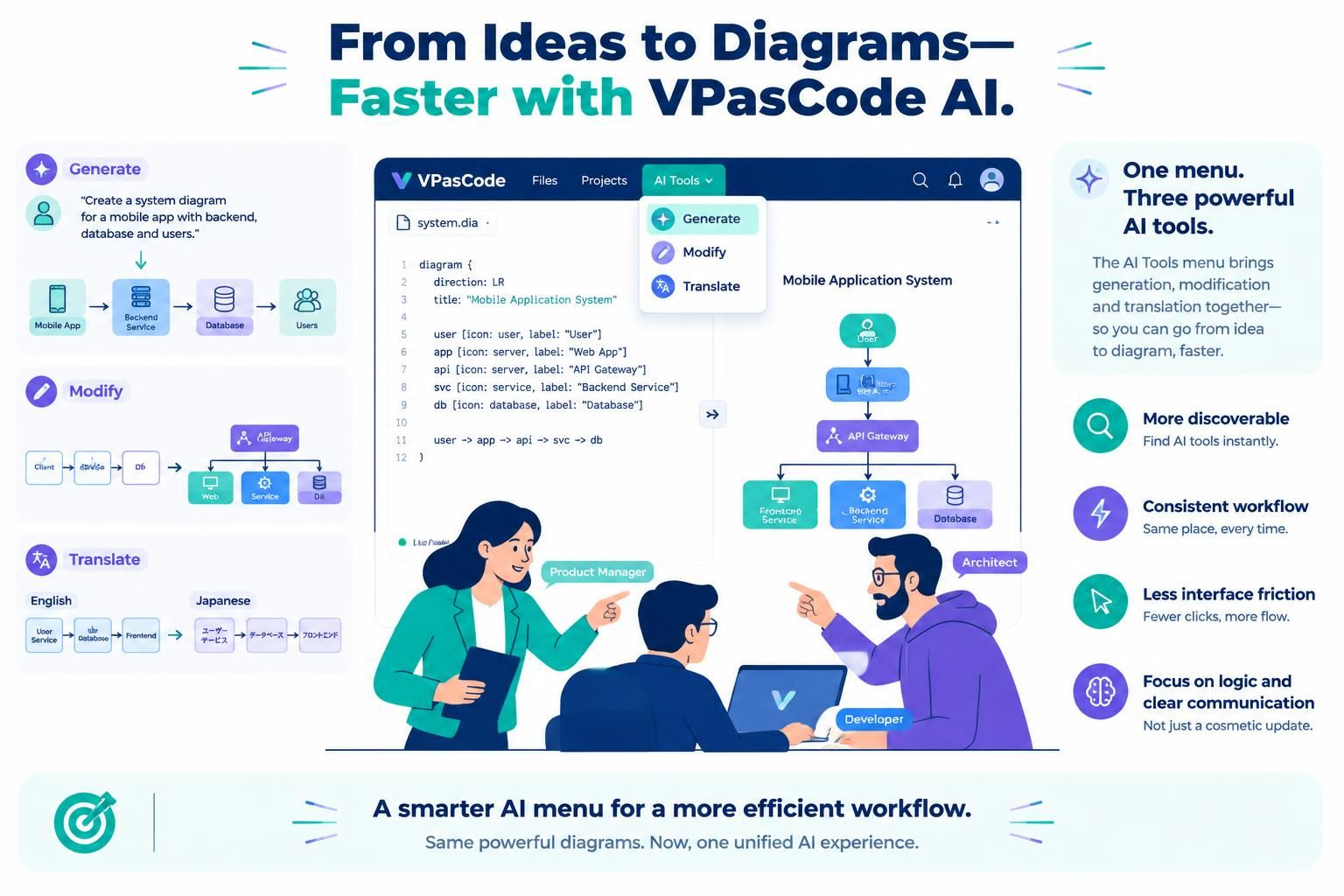
Previously, AI features in diagramming software were often scattered across various menus, requiring users to hunt for specific tools. The new update in VPasCode addresses this by consolidating the platform’s most powerful AI functions into a single, intuitive drop-down menu located in the app bar.
This consolidation is not merely cosmetic; it represents a strategic shift toward a more discoverable and consistent workflow. By grouping the three core AI capabilities—Generate, Modify, and Translate—into one accessible location, VPasCode significantly reduces the cognitive load on the user. This allows professionals to focus on refining their system logic rather than navigating complex user interfaces.
Core AI Capabilities Explained
The power of this unified interface lies in the synergy of its three main functions, which handle the entire lifecycle of a diagram from creation to refinement.
1. Generate: From Concept to Code
The “Generate” function acts as the bridge between natural language and formal diagramming syntax. Instead of manually placing boxes and drawing arrows, users can describe their system architecture in plain English. The AI parses this input and constructs the underlying VPasCode (Domain Specific Language) syntax.
For example, a prompt such as “Create a system diagram for a mobile app with backend, database and users” is instantly processed. The AI understands the intent, selects the appropriate icons (e.g., server, database, user), and arranges them logically within the defined direction of the diagram.
2. Modify: Iterative Refinement
Once a diagram is generated, the “Modify” tool allows for rapid iteration. Rather than rewriting code from scratch, users can issue commands to add, remove, or restructure components. This is crucial for agile development environments where requirements change frequently. The AI interprets the modification request and updates the code structure and the visual representation simultaneously.
3. Translate: Bridging Language Barriers
The “Translate” feature leverages AI to localize diagram content. This is particularly valuable for global teams or when presenting to non-technical stakeholders. As shown in the interface examples, VPasCode can translate diagram labels and descriptions between languages (e.g., English to Japanese) while maintaining the structural integrity of the diagram. This ensures that the logic remains clear regardless of the language spoken by the audience.
Understanding the Code Structure
At the heart of VPasCode is its Domain Specific Language (DSL). Even when using AI to generate diagrams, understanding the underlying syntax provides greater control. The AI constructs this code automatically, but the structure follows logical blocks.
Consider the architecture of a “Mobile Application System” generated via AI. The code defines the direction of the flow, sets a title, and then defines the entities and their relationships.
diagram {
  direction: LR
  title: "Mobile Application System"

  user [icon: user, label: "User"]
  app [icon: server, label: "Web App"]
  api [icon: server, label: "API Gateway"]
  svc [icon: service, label: "Backend Service"]
  db [icon: database, label: "Database"]

  user -> app -> api -> svc -> db
}
In this snippet, we see how the AI translates the user’s prompt into specific syntax. The diagram block sets the orientation to Left-to-Right (LR). The subsequent lines define the nodes with specific icons and labels, and the final line establishes the data flow path. This “diagram-as-code” approach ensures that the diagram is always version-controllable and text-editable.
Benefits of the New Interface
The integration of these tools into a single menu offers several distinct advantages for system modeling:
- More Discoverable: Find AI tools instantly without digging through nested menus.
- Consistent Workflow: A single place for all AI interactions ensures a predictable experience every time.
- Less Interface Friction: Fewer clicks and more flow mean you stay in the “zone” of designing your system.
- Focus on Logic: By automating the visual layout and syntax, users can focus on the architectural decisions and clear communication of ideas.
Conclusion
The update to the VPasCode AI interface marks a significant step forward in making system architecture accessible. By unifying generation, modification, and translation tools, Visual Paradigm has created an environment where the barrier between thinking and documenting is removed. Whether you are a Product Manager defining the scope of a new mobile app or an Architect detailing the backend service interactions, the new AI Tools menu provides a faster, more efficient path to clear, professional diagrams.