
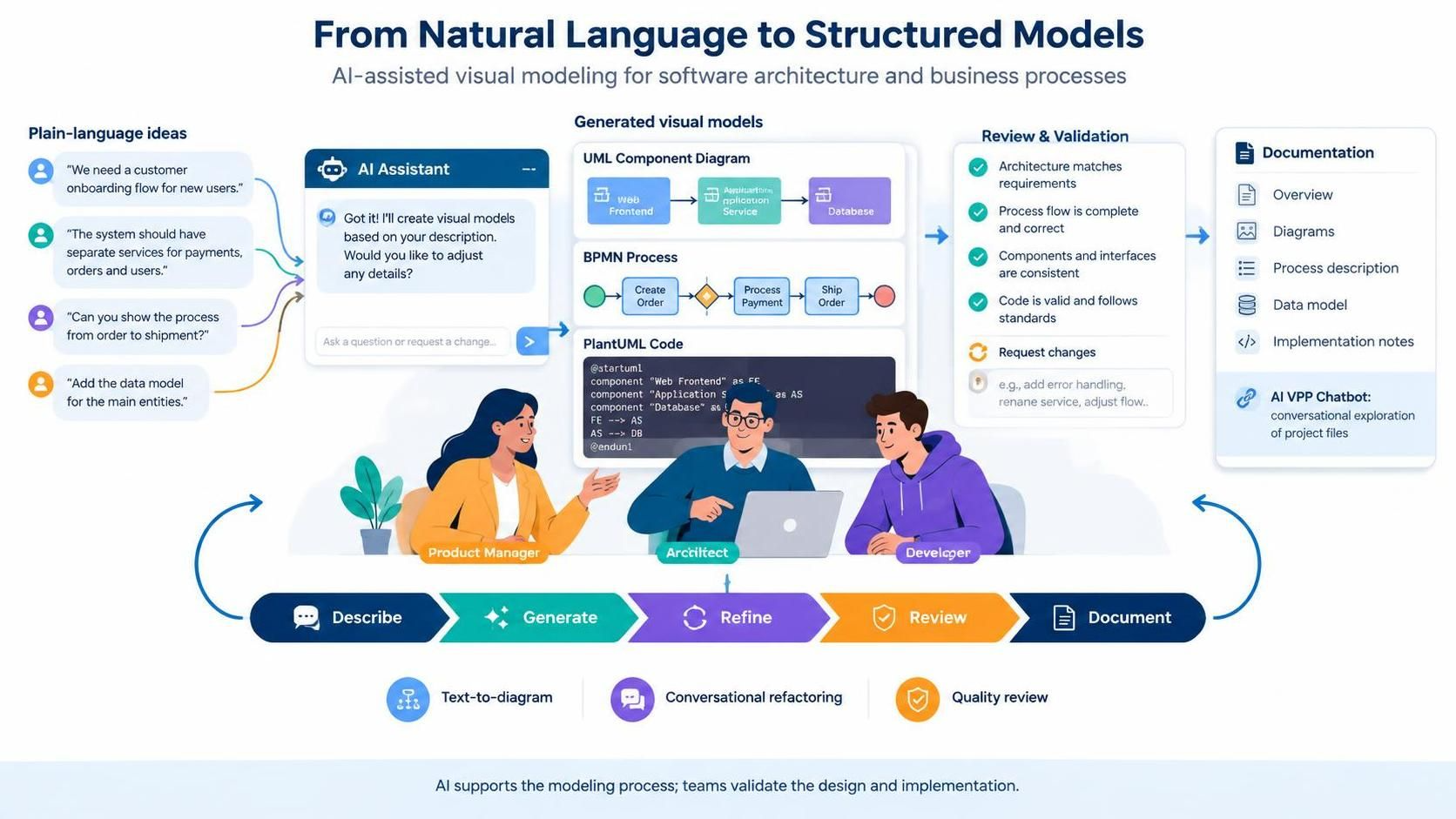
The landscape of software architecture and business process modeling is undergoing a significant transformation. For decades, creating diagrams meant manually dragging shapes, aligning connectors, and ensuring syntactic correctness—a tedious process that often distracted from the core logic and design thinking. Enter the AI Chatbot, a conversational, text-driven ecosystem that promises to bridge the gap between natural language ideas and structured visual models.
This guide explores how this AI-powered ecosystem redefines visual modeling, offering instant text-to-diagram generation, conversational refactoring, and integrated quality review. We will examine key concepts, provide practical PlantUML examples, and compare specialized AI tools against general Large Language Models (LLMs) to help product managers, architects, and developers leverage this technology effectively.
The New Workflow: Describe, Generate, Refine, Review
Traditional modeling tools are often passive; they wait for a user to click a button and draw a line. The new AI Chatbot ecosystem is active and conversational. It transforms the modeling process into a collaborative dialogue between human intent and machine execution.
1. Describe: From Plain Language to Context
The journey begins with “Plain-language ideas.” Instead of forcing a Product Manager to learn the specific syntax of a diagramming tool, they can simply state their requirements. The system interprets these natural language inputs—such as “We need a customer onboarding flow” or “The system should have separate services for payments”—and prepares them for generation.
2. Generate: Instant Text-to-Diagram
The core promise of the AI Chatbot is the ability to describe systems, processes, or requirements in plain language and receive syntactically correct diagrams automatically. This eliminates the manual drag-and-drop burden, allowing users to focus on the “what” rather than the “how” of drawing. Whether it’s a UML class diagram, a BPMN process flow, or an ArchiMate enterprise architecture view, the AI interprets context and structure to generate accurate visuals.
3. Refine: Conversational Refactoring
Once the initial model is generated, the AI does not stop. It offers a conversational interface to adjust details. If the user asks, “Can you show the process from order to shipment?”, the AI understands the scope change and refactors the diagram accordingly. This iterative loop allows for rapid prototyping without the friction of manual editing.
Deep Dive: PlantUML and the AI Ecosystem
While the user interacts with a friendly chat interface, the underlying engine is a powerful text-based modeling language. The AI Chatbot translates the user’s natural language requests into executable code (specifically PlantUML in this context) to render the visual model.
This approach ensures that the diagrams are not just static images but are actually code that can be versioned, shared, and rendered. The AI acts as the compiler, taking the messy input of human thought and compiling it into the structured syntax required by the modeling engine.
Example: Generating a Component Diagram
To understand how the AI translates a request into a model, consider the following scenario. A user asks to create a simple architecture with a Web Frontend, an Application Service, and a Database. The AI Chatbot internally generates the following PlantUML code to create this structure:
@startuml
component "Web Frontend" as FE
component "Application Service" as AS
component "Database" as DB

FE --> AS
AS --> DB
@enduml
By generating this code, the AI ensures that the connectivity is logical (Frontend talks to Service, Service talks to Database) and that the visual representation is standard-compliant.
Example: Generating a BPMN Process
Similarly, for business processes, the AI constructs a BPMN flow. If the request is to “Create Order,” “Process Payment,” and “Ship Order,” the AI constructs a flow that includes the necessary gateways and sequence flows to represent the business logic accurately.
Review and Validation: Quality Assurance
The final step in this ecosystem is Review & Validation. The AI Chatbot doesn’t just generate a pretty picture; it performs a quality check. It verifies that the architecture matches requirements, the process flow is complete and correct, and components are consistent.
This automated review process highlights potential issues, such as missing error handling or inconsistent naming conventions, before the diagram is finalized. It acts as a code review tool for visual models, ensuring that the documentation is as robust as the software it represents.
Documentation: From Model to Artifact
The ultimate goal of modeling is often documentation. The AI Chatbot ecosystem seamlessly bridges the gap between the visual model and the documentation artifacts. Once the model is reviewed and validated, the system can generate:
- Overview: High-level summaries of the system.
- Diagrams: The visual models themselves.
- Process Description: Detailed textual explanations of the workflows.
- Data Model: Entity-relationship diagrams and data dictionaries.
- Implementation Notes: Technical details derived from the architecture.
This end-to-end flow ensures that the documentation stays in sync with the design, eliminating the common pitfall of outdated diagrams.
Conclusion
The AI Chatbot ecosystem represents a paradigm shift in how we approach software architecture and business process modeling. By leveraging natural language processing and specialized modeling engines, it empowers teams to move faster and focus on design rather than mechanics. Whether you are a Product Manager defining requirements, an Architect designing the system, or a Developer implementing the logic, this AI-powered workflow provides a unified language for collaboration.