
In the realm of modern enterprise architecture, design models are no longer static artifacts locked away in desktop applications. They have evolved into rich repositories of critical business logic, system requirements, and structural data. However, for years, a significant barrier existed: extracting actionable insights from these complex Visual Paradigm projects required deep technical expertise or direct access to the heavy desktop client. This often left valuable data trapped within .vpp files, inaccessible for reporting, analysis, or integration with other systems.
Enter QueryBase, a powerful web-based tool designed to democratize access to your Visual Paradigm project data. Acting as a bridge between your cloud workspace and your analytical needs, QueryBase enables teams to explore, query, and extract valuable data without the overhead of installing software.
This guide walks you through the core concepts of the QueryBase system architecture, explaining how it transforms static models into dynamic, queryable assets.
Understanding the System Architecture
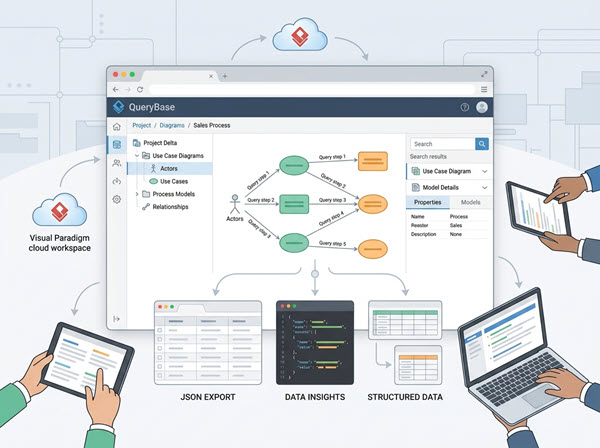
The architecture of Visual Paradigm QueryBase is built on a client-server model designed to decouple the visualization of data from the heavy lifting of data processing. It allows for a seamless flow of information from the project repository to various analytical endpoints.
The Cloud Workspace
At the heart of the system is the Visual Paradigm Cloud Workspace. This serves as the centralized repository where the .vpp project files are stored and managed. Unlike traditional desktop-only architectures, the cloud workspace ensures that the data is accessible via API and web interfaces, serving as the single source of truth for all modeling activities.
The QueryBase Interface
The QueryBase interface acts as the middleware. It does not merely display a rendered image of a diagram; instead, it parses the underlying XML or database structure of the project. This allows the system to treat diagram elements (like Actors, Use Cases, or Process Models) as structured data records.
When a user interacts with the interface to select a specific model, such as a Use Case Diagram, QueryBase performs the following logical operations:
- Metadata Retrieval: It fetches the structural properties of the elements, such as names, descriptions, and relationships.
- Contextual Linking: It maps the visual nodes (e.g., the “Actors” and “Use Cases”) to their corresponding data attributes.
- Query Execution: It constructs a query that traverses the graph of the model to find specific relationships or attributes.
Data Export Mechanisms
The output of this architecture is designed to be interoperable. As illustrated in the system flow, QueryBase supports three primary modes of data consumption:
- JSON Export: For developers and API integrators, the data can be exported in
JSONformat, making it immediately consumable by JavaScript-based applications or microservices. - Data Insights: For business analysts, the system can render structured data views that highlight trends, gaps, or missing relationships within the model.
- Structured Data (Spreadsheets): The system supports exporting to standard spreadsheet formats, allowing for offline analysis in tools like Excel or Google Sheets.
Modeling Concepts in QueryBase
One of the most powerful features of QueryBase is its ability to treat different diagram types as distinct data domains. Let’s examine how the system handles a Use Case Diagram, a common element in requirement engineering.
Actors and Use Cases as Data Entities
In a traditional modeling environment, an Actor is a visual shape. In QueryBase, an Actor is a data entity with specific properties. When you query a Use Case Diagram, you are essentially running a database query against the table of Actors and the table of Use Cases.
The system allows you to filter based on properties such as:
- Name: Find all actors named “Admin” or “Guest”.
- Position: Analyze the spatial distribution of elements (rare but useful for layout analysis).
- Description: Search for specific keywords within the documentation of a Use Case.
Relationship Traversal
The power of QueryBase lies in its ability to traverse relationships. In the context of a Use Case Diagram, the system can answer complex questions such as:
// Conceptual Query Logic
{
  "source": "Actor",
  "relationship": "Associates With",
  "target": "Use Case",
  "filter": {
    "target": {
      "name": "Process Order"
    }
  }
}
This logic allows the system to dynamically build a list of all actors capable of performing a specific function, or conversely, to identify all use cases that are orphaned (i.e., not associated with any actor).
Real-World Applications
The transition from static diagrams to queryable data opens up several real-world scenarios for enterprise teams:
1. Automated Documentation Generation
By querying the “Description” and “Purpose” fields of all Use Cases, teams can automatically generate requirement documents or API documentation, ensuring that the text in the diagram always matches the external documentation.
2. Impact Analysis
When a system requirement changes, QueryBase can quickly identify which diagrams contain the affected element. By querying the “Project Data” to find all references to a specific class or actor, teams can assess the scope of a change before it is implemented.
3. Integration with DevOps Pipelines
For organizations using CI/CD pipelines, QueryBase can act as a data source. The JSON Export feature allows the model data to be fed into deployment scripts, ensuring that the deployed application matches the architectural blueprint.
Conclusion
QueryBase represents a significant shift in how we interact with architectural models. By removing the dependency on the desktop client and exposing the underlying data structure through a web interface, it empowers teams to treat their design repositories as living, breathing data sources. Whether for reporting, analysis, or integration, QueryBase ensures that your Visual Paradigm projects remain accessible and actionable in the modern digital landscape.