
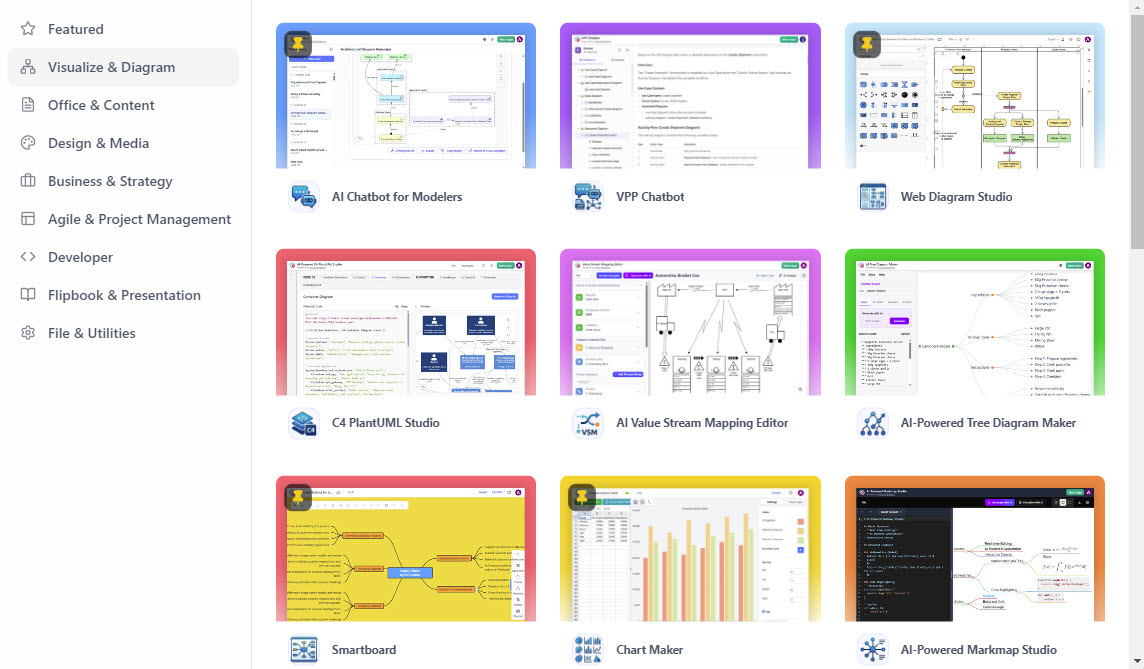
In the evolving landscape of software architecture and systems design, the separation of tools often creates friction. Teams jump between desktop modeling environments, web-based design tools, and office productivity suites, leading to fragmented data and lost context. The Visual Paradigm Unified Platform addresses this by introducing a “Command Center” architecture. This is not merely a dashboard; it is an architectural innovation that unifies resources into a single, cohesive ecosystem.
This tutorial explores the structural components of this platform, analyzing how the Unified Artifact Hub, Centralized App Launcher, and Seamless Creation UI work together to streamline the engineering workflow.
1. The Unified Artifact Hub: A Drive-Like Interface
The core of this ecosystem is the Unified Artifact Hub. Traditional file management in enterprise environments often suffers from silos—a UML diagram might live in a local .vpd file, a web prototype in a cloud design tool, and the requirements document in a Word file. The Unified Artifact Hub fundamentally changes this by aggregating these disparate resources into one location.
Key Architectural Features:
- Unified Storage View: It provides a familiar, drive-like interface where you can view and manage diagrams from Visual Paradigm Desktop, designs from web apps, and data from office tools simultaneously.
- Context Preservation: By centralizing these artifacts, the platform ensures that when you switch contexts (e.g., from modeling to documentation), you do not lose the thread of the project.
- Single Source of Truth: This hub acts as the central repository, reducing version control conflicts and ensuring stakeholders are looking at the latest data.
2. Centralized App Launcher: The Ecosystem Aggregator
Visual Paradigm is known for its breadth of functionality, offering over 100 distinct applications for specific modeling needs (such as C4 PlantUML Studio, AI Value Stream Mapping, or Web Diagram Studio). Managing the installation or navigation of this vast array of tools can be a bottleneck.
The Centralized App Launcher solves this by acting as a single, organized hub. It allows users to discover and launch any available Visual Paradigm Online app without ever leaving the workspace. This is crucial for maintaining a stateful workflow, where the user’s session data and context are preserved across different tool invocations.
Architectural Benefits of the Launcher:
- Reduced Latency: Eliminates the need to log into separate micro-services or open new browser tabs.
- Scalability: As new tools are added (e.g., future AI integrations), they appear instantly in the launcher without requiring user configuration.
- Role-Based Access: It can present different sets of tools based on the user’s role (e.g., showing “Agile” tools to a Project Manager and “Code” tools to a Developer).
3. Seamless Creation UI: The Instantiation Engine
The final pillar of this architecture is the Seamless Creation UI. In many systems, starting a new task requires navigating through multiple menus or selecting a specific template file. The Unified Platform redesigns this flow to be instantaneous.
This feature allows users to instantly start a new diagram, document, or design from any of the integrated apps directly from the central dashboard. This “seamless” aspect implies that the creation process is not a disjointed event but a natural continuation of the workflow. Whether you are sketching a quick mind map or generating a complex sequence diagram, the UI adapts to the immediate need.
Technical Implementation: The Underlying Logic
From a technical standpoint, this platform represents a shift from monolithic desktop applications to a micro-service architecture wrapped in a unified frontend. The “Unified Platform” acts as an orchestration layer. When you launch an app like the AI Chatbot for Modelers, the system authenticates the user against the central identity provider, fetches the necessary context (the current project or folder), and renders the specific application module.
This approach ensures that the data generated in the “Office & Content” section can be seamlessly referenced in the “Visualize & Diagram” section. The separation of concerns is handled at the backend, while the user experiences a unified, singular environment.
Conclusion
The Visual Paradigm Unified Platform represents a maturation of the engineering toolset. By unifying the Artifact Hub, App Launcher, and Creation UI, it eliminates the “context switching” penalty that plagues modern software development. For architects and developers, this means less time managing tools and more time designing the systems that matter.