
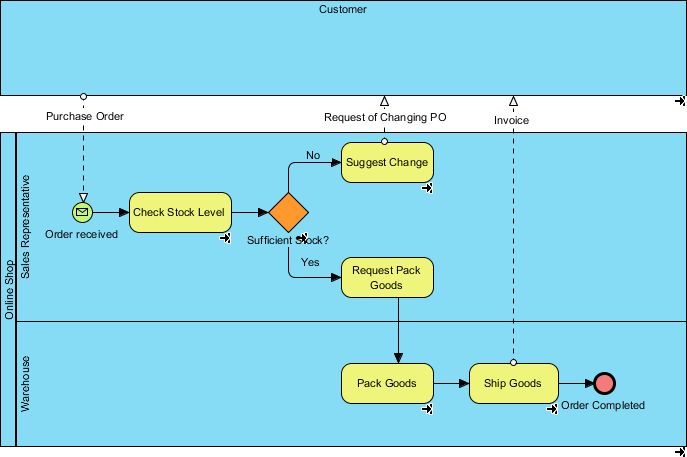
In the world of Business Process Model and Notation (BPMN 2.0), clarity is king. This tutorial dives deep into a classic Order Fulfillment scenario, breaking down how to visualize complex interactions between different organizational roles. We will analyze a specific process flow involving a Customer, Sales Representative, and Warehouse, utilizing Visual Paradigm to create a professional-grade diagram.
This guide serves as a comprehensive walkthrough for understanding the system architecture of a simple transaction, moving from the initial Purchase Order to the final Order Completion.
1. The Architecture of the Process: Swimlanes and Roles
The foundation of any BPMN diagram is the Swimlane. Swimlanes allow us to categorize activities by the entity (or “Actor”) responsible for them. In this specific Order Fulfillment model, we see a clear segregation of duties:
- Customer: The initiator of the process. They provide the input but do not perform internal checks.
- Sales Representative: The gatekeeper. This role is responsible for receiving the order and validating inventory levels.
- Warehouse: The executor. Once validated, this role handles the physical logistics of packing and shipping.
When modeling this in Visual Paradigm, it is crucial to ensure that the flow of control crosses these boundaries logically. For instance, notice how the “Sales” lane communicates with the “Warehouse” lane via specific message flows.
2. The Sequence of Events
Let’s walk through the lifecycle of a single Order in this model, step-by-step.
Step 1: Initiation (The Purchase Order)
The process begins in the Customer lane. The Customer triggers the event by sending a Purchase Order. In BPMN terms, this is an Intermediate Message Event or an Input Message crossing the boundary of the diagram into the Sales Representative lane.
Step 2: Validation (Check Stock Level)
Upon receiving the order, the process moves to the Sales Representative. The first activity performed is Check Stock Level. This is a crucial decision point in the supply chain. The system (or the human agent) must verify if the requested goods are available.
Step 3: The Gateway (Decision Logic)
This is where the logic splits. The diagram features an Exclusive Gateway (represented by the orange diamond shape). This gateway asks the question: “Sufficient Stock?”
The flow branches into two distinct paths based on the answer:
- Path A: Insufficient Stock (No)
If the stock check fails, the flow moves to a Suggest Change task. This activity usually involves contacting the customer to negotiate a substitute product or a delayed shipment. This path effectively terminates the current standard order flow.
- Path B: Sufficient Stock (Yes)
If the stock is available, the process continues to the next task: Request Pack Goods. This is a signal sent to the Warehouse to initiate physical fulfillment.
Step 4: Fulfillment (Warehouse Operations)
Once the “Yes” path is taken, the responsibility shifts to the Warehouse lane. The process follows a linear sequence of physical actions:
- Pack Goods: The items are retrieved from inventory and packed for shipment.
- Ship Goods: The package is handed over to a carrier or logistics provider.
Step 5: Completion
The process concludes with an End Event (the red circle) labeled “Order Completed.” This signifies that the transaction is successfully closed, and the goods are on their way to the Customer.
3. Technical Modeling in Visual Paradigm
Visual Paradigm offers a robust environment for creating these diagrams. When constructing this specific flow, consider the following modeling techniques:
- Message Flows vs. Sequence Flows: Use Sequence Flows (solid arrows) for steps occurring within the same swimlane (e.g., inside the Warehouse). Use Message Flows (dashed arrows) for interactions crossing between swimlanes (e.g., Customer to Sales, or Sales to Warehouse).
- Gateway Configuration: When double-clicking the diamond gateway to configure it, ensure the condition labels (“Yes”, “No”) are explicitly defined to prevent ambiguity in the execution path.
- Visual Styling: Visual Paradigm allows for easy customization of the Check Stock Level task. You might choose a rounded rectangle for standard tasks, or a specific icon for system tasks if this were an automated check.
Conclusion
This Order Fulfillment process is a fundamental example of how BPMN bridges the gap between business strategy and technical implementation. By clearly defining the roles of Customer, Sales, and Warehouse, and by implementing a robust decision gateway, we create a process that is not only visually clear but also logically sound. Using tools like Visual Paradigm ensures that these models are precise, standardized, and ready for analysis or automation.