
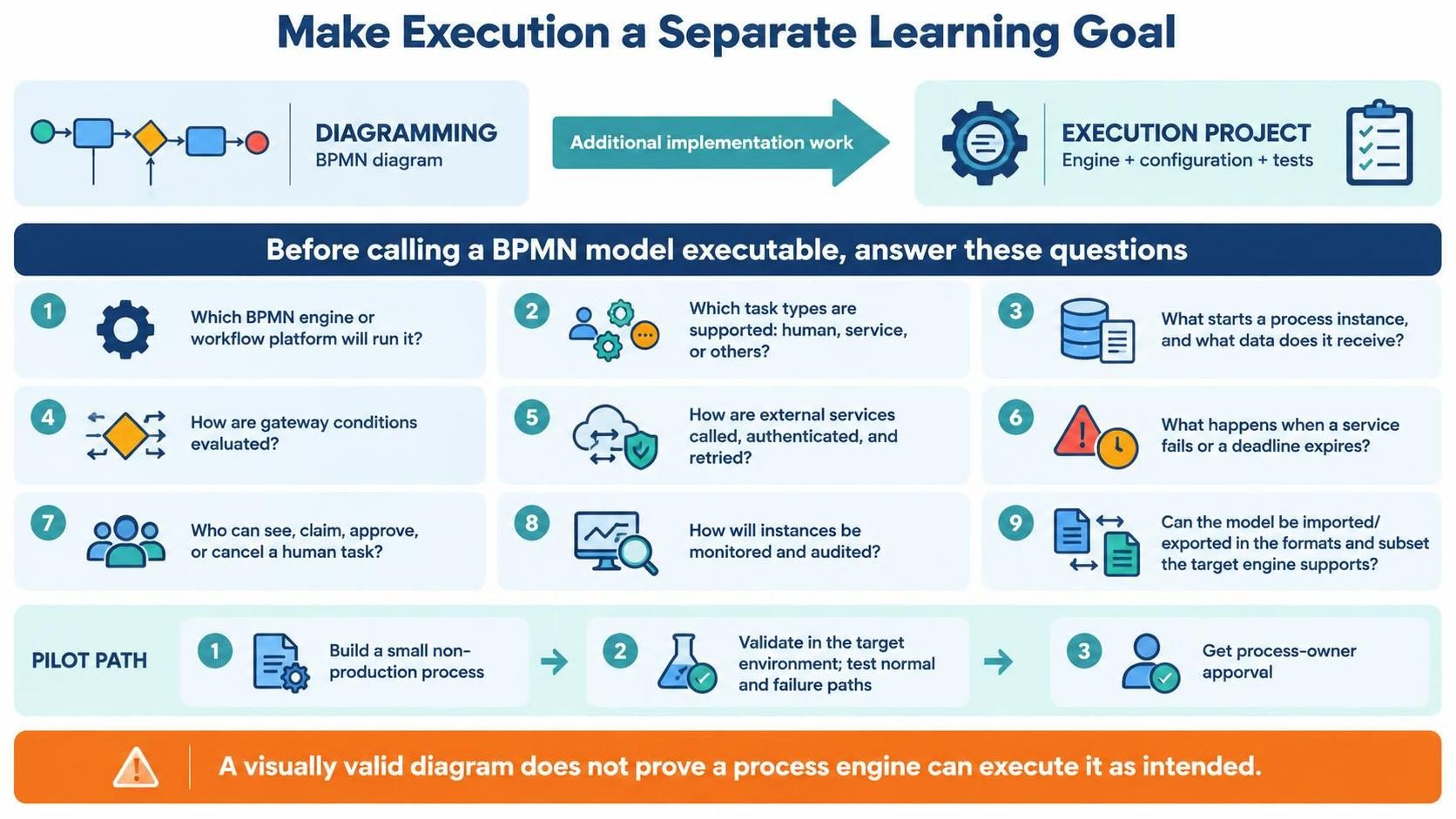
In the world of Business Process Management (BPM), a common pitfall is assuming that a diagram is finished once it is drawn. The infographic provided illustrates a critical industry standard: Stage Four—Making Execution a Separate Learning Goal. This concept dictates that a BPMN diagram is not merely a documentation exercise or a final checkbox, but the beginning of a distinct engineering project.
To move from a static representation of a process to a dynamic, running system, you must treat the “Execution Project” as a separate entity from the “Diagramming” phase. This shift in mindset ensures that your models are not just visually appealing, but technically robust and ready for automation.
1. The Paradigm Shift: Diagramming vs. Execution
The visual flowchart presents a clear dichotomy. On the left, you have Diagramming, which involves creating a BPMN diagram. This is often a high-level, conceptual activity focused on flow, logic, and visual communication. On the right, you have the Execution Project, which encompasses the engine, configuration, and testing required to make that diagram run.
The bridge between these two states is labeled “Additional implementation work.” This is the gap that often causes projects to fail. A diagram might be logically sound on paper, but without the specific implementation work to configure the target engine, it remains a static image. The “Execution Project” adds the necessary layers of complexity, including:
- Engine Selection: Defining the software that will interpret the BPMN.
- Configuration: Mapping abstract tasks to concrete resources.
- Testing: Validating that the model behaves as intended under various conditions.
2. The Pre-Flight Checklist: 9 Critical Questions
Before declaring a BPMN model “executable,” you must rigorously answer a set of implementation questions. These questions ensure that the transition from design to code (or configuration) is seamless. We will break these down into three logical clusters: Architecture, Logic, and Operations.
A. Architecture and Infrastructure
The first set of questions focuses on the technical environment:
- Which BPMN engine or workflow platform will run it?
You cannot execute a process without a host. You must decide between a lightweight workflow engine, a full BPM suite, or a cloud-native service. The choice dictates the capabilities available to you.
- Which tasks are human, service, or other supported types?
A rectangle in a diagram is just a shape until you define its “execution type.” Is it a manual form for a user (Human Task), a call to a REST API (Service Task), or a script (Script Task)?
- What starts an instance, and what data does it receive?
You must define the “Start Event.” Does this process start when a file is dropped in a folder, when an email arrives, or when a user clicks a button? Furthermore, you must define the payload—the data object that initiates the process.
B. Logic and Flow Control
Once the environment is set, the internal logic must be scrutinized:
- How are gateway conditions evaluated?
In a diagram, a diamond represents a decision. In execution, this requires actual code or expression evaluation. You must ensure that the conditions (e.g.,
amount > 1000) can be evaluated using the available data objects. - How are external services called, authenticated, and retried?
Service tasks are not magic. They require HTTP headers, authentication tokens (OAuth, API keys), and network configuration. You must also define retry policies: if the external service times out, should the system wait 5 seconds and try again?
- How are gateway conditions evaluated?
(Note: This often overlaps with logic flow. Ensure that complex expressions can be parsed by the engine).
C. Operations and Exception Handling
The most critical part of execution is handling the unexpected:
- What happens when a service fails or a deadline expires?
This is the difference between a model that works in a lab and one that works in production. You need Error Events (to catch exceptions) and Timer Events (to handle deadlines). If a human task is not completed by Friday, what happens?
- Who can see, claim, approve, or cancel a human task?
Human tasks require authorization logic. Can anyone claim the task, or is it restricted to a specific role (e.g., “Manager”)? Who has the rights to view the process instance?
- How will process instances be monitored and audited?
You need a dashboard or a log. How will you track the KPI of this process? Is there an audit trail of who changed the state of a task?
- Can the model be exported and imported in the formats the target engine supports?
This is a technical compatibility check. Visual Paradigm can export BPMN 2.0 XML, but does the specific engine you chose support that specific subset of the standard?
3. The Pilot Path: A Strategy for Success
The infographic concludes with a recommended strategy called the “Pilot Path.” This is a three-step approach to de-risk the implementation:
- Build a small non-production process.
Do not start with your most complex, mission-critical workflow. Start with a simple “Hello World” process or a low-risk workflow to verify that your toolchain works.
- Validate in the target environment.
Deploy the model to the engine. Test normal paths (everything goes right) and failure paths (services fail, deadlines are missed). This is the “smoke test” of your BPMN model.
- Get process-owner approval.
Once the system runs as expected, have the business stakeholders (process owners) review the behavior. They must confirm that the execution matches their expectations.
Conclusion: Visual Validity is Not Execution
The final warning in the infographic is paramount: “A visually valid diagram does not prove a process engine can execute it as intended.”
In the era of low-code and automation tools, it is tempting to drag and drop shapes until they look right. However, true BPM maturity requires moving beyond the visual layer. By treating execution as a separate learning goal and rigorously answering the implementation questions, you ensure that your diagrams become powerful, automated engines of business value.