
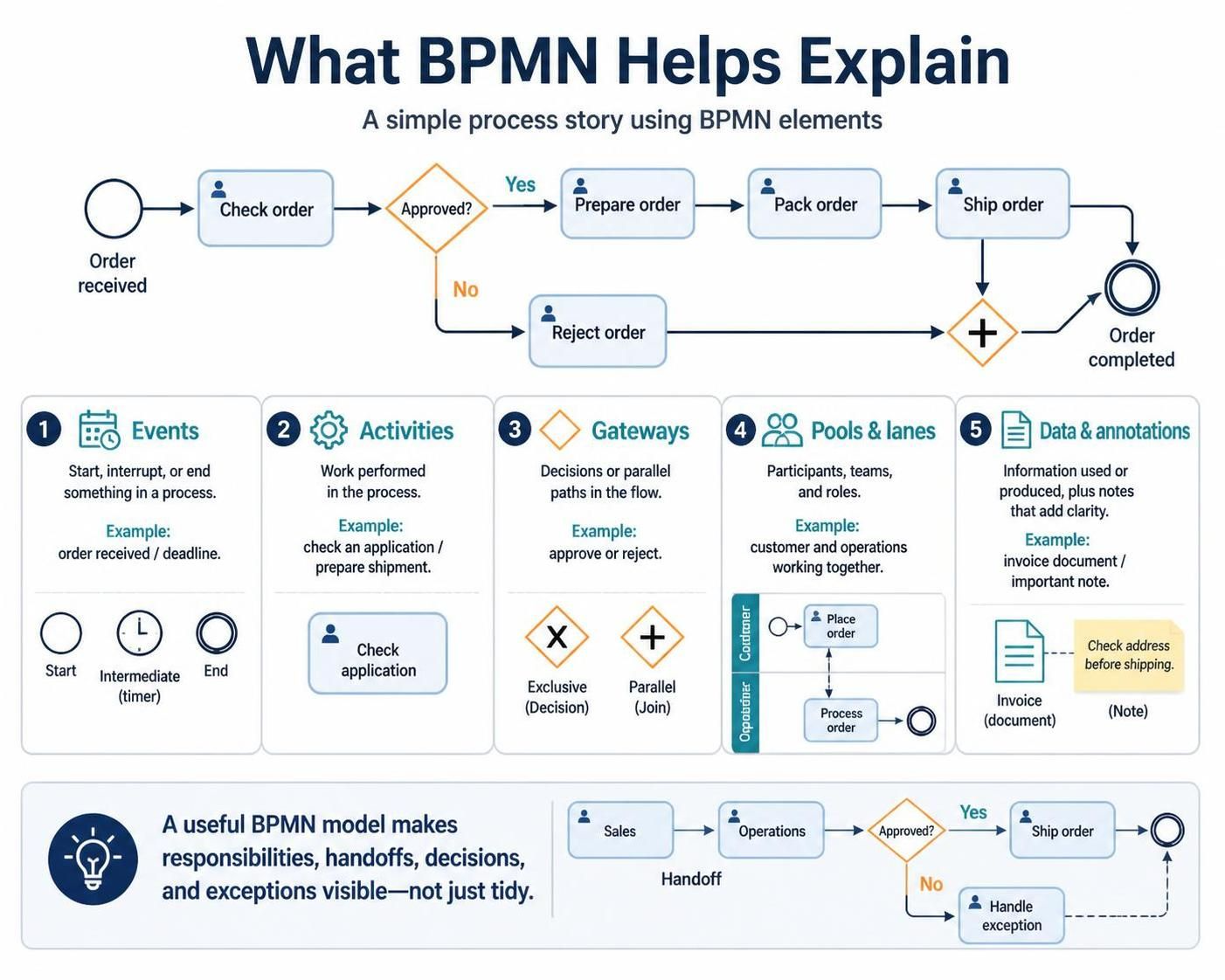
BPMN (Business Process Model and Notation) is more than just a way to draw flowcharts; it is a language used to describe business processes in a way that both business stakeholders and technical developers can understand. As explained in our reference material, a BPMN diagram tells a specific story: how work proceeds from a specific trigger to a final outcome.
In this tutorial, we will break down the core architecture of BPMN using the “Order Processing” example, exploring how Visual Paradigm (VP) allows us to construct models that make responsibilities, handoffs, and exceptions visible.
The Anatomy of a BPMN Story
Every BPMN diagram is built from a set of standardized building blocks. These elements work together to create a logical flow. Let’s dissect the five fundamental components shown in our diagram.
1. Events: The Triggers and Outcomes
Events are the “things that happen” during a process. They are represented by circles and define the start, interruption, or termination of a flow.
- Start Event: In the order example, the process begins when an Order is received. This is the trigger.
- Intermediate Events: These occur during the process, such as waiting for a timer or receiving a specific message.
- End Event: The process concludes with an Order completed state.
2. Activities: The Work
Activities represent the actual work performed. In the diagram, you will see rounded rectangles with a person icon, indicating that a human actor is involved (e.g., Check order, Prepare order, Pack order).
3. Gateways: The Decisions
Gateways control the flow of the process by introducing logic. The most common type is the Exclusive Gateway (the diamond with an ‘X’).
In our example, the Approved? gateway splits the flow:
- If Yes, the process continues to Prepare order.
- If No, the flow diverts to Reject order.
Later, a Parallel Gateway (the diamond with a ‘+’) is used to merge the two paths back together before the order is completed.
4. Pools and Lanes: The Participants
To make responsibilities clear, BPMN uses Pools and Lanes. A Pool represents a participant (like a company or a specific customer), while Lanes organize the work within that participant.
For example, a complex process might separate the Customer from Operations, or divide operations into Sales and Shipping. This visualizes the “handoff” points where one team passes work to another.
5. Data and Annotations
Finally, Data Objects and Annotations provide context. They show what documents (like an Invoice) are created or consumed, or they offer notes to clarify the model, ensuring the diagram isn’t just “tidy” but actually represents reality.
Visualizing the “Order Process” in Visual Paradigm
When building this model in Visual Paradigm, the tool enforces strict syntax rules to ensure the model is valid. Below is a representation of the logic flow for the “Check Order” process.
[Start Event: Order Received]
      |
      v
[Activity: Check Order]
      |
      v
[Gateway: Approved?] --(Yes)--> [Activity: Prepare Order] --(Next)--> [Activity: Pack Order] --(Next)--> [Activity: Ship Order]
      |
      | (No)
      v
[Activity: Reject Order]
      |
      v
[Parallel Gateway: Merge]
      |
      v
[End Event: Order Completed]
Why This Matters: Making Exceptions Visible
The text emphasizes that the value of BPMN is not just making a process look tidy. A useful model must make exceptions visible. In the bottom section of our diagram, we see a “Handoff” from Sales to Operations, followed by a decision. If the decision is “No,” the process moves to “Handle exception.” Without this specific path drawn, the model would fail to represent how work actually gets done when things go wrong.
Conclusion
By combining these elements—Events, Activities, Gateways, and Pools—you create a robust architecture for process improvement. Whether you are mapping out a simple approval chain or a complex multi-department workflow, BPMN provides the visual vocabulary needed to ensure everyone is on the same page.