
In the realm of software architecture, representing complex logic within a static diagram is a challenge. When requirements involve branching paths—such as authentication success versus failure, or error handling—standard sequential flow diagrams often fail to capture the dynamic nature of the system. This is where the alt (alternative) fragment in UML Sequence Diagrams becomes indispensable. Using VPasCode, an AI-assisted diagramming tool, we can translate this logical complexity into clear, executable code that renders into professional visual models.
This tutorial explores how to model conditional logic, specifically focusing on a login authentication scenario. We will dissect the syntax of the alt fragment, understand the role of guard conditions, and see how this text-based approach streamlines the design process.
Understanding the Sequence Diagram Fragment
A UML Sequence Diagram illustrates how objects or actors interact over time. While it excels at showing a linear conversation between a User and a Login API, real-world systems must handle exceptions. The alt fragment provides a structured way to define these “alternative” paths.
In the context of VPasCode, the fragment is defined by specific keywords:
- fragment: The block of code that contains the alternative paths.
- alt: Indicates that there are multiple mutually exclusive options.
- else: Separates the primary condition from the fallback condition.
- end: Closes the fragment block.
Applying Guard Conditions
The most critical aspect of the alt fragment is the guard condition. These are boolean expressions enclosed in square brackets [] that determine which path is taken. For example, [credentials valid] acts as a switch. If the condition evaluates to true, the messages inside that block are executed; otherwise, the system looks for the next path.
Case Study: The Authentication Logic
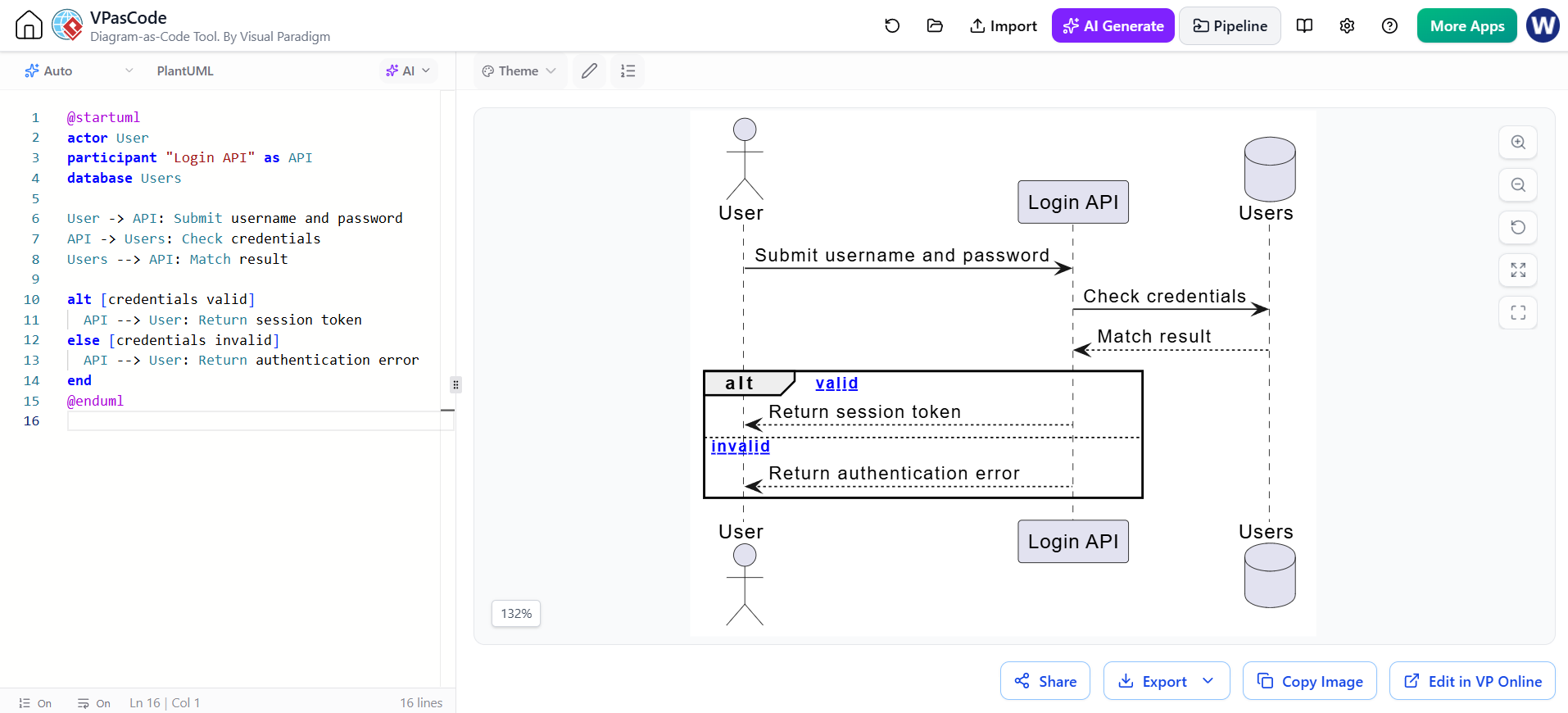
Let us walk through a practical example: an authentication flow. The diagram involves three participants: an external User, a Login API, and a Users database.
The logic proceeds as follows: The user submits credentials. The API checks the database. If the match is successful, a session is returned. If not, an error is returned. In VPasCode, this logic is written concisely:
@startuml
actor User
participant "Login API" as API
database Users

User -> API: Submit username and password
API -> Users: Check credentials
Users --> API: Match result

alt [credentials valid]
  API --> User: Return session token
else [credentials invalid]
  API --> User: Return authentication error
end
@enduml
Step-by-Step Breakdown
- Setup: We define the participants. The
actorrepresents the human user, whileparticipantanddatabaserepresent system components. - Initial Interaction: The
User -> APImessage initiates the process. The API then queries the database, and the database returns the result. - The Alt Block: We open the
altblock. Here, we define the two possible outcomes based on theMatch result. - Valid Path: Inside the first section, we check if
[credentials valid]. If true, the API sends aReturn session tokenback to the User. - Invalid Path: The
elsekeyword handles the fallback. If the credentials are invalid, the API sends aReturn authentication error.
Visualizing the Result
When VPasCode renders this code, it creates a visual representation that is standard in UML. You will see a large frame labeled alt. Inside this frame, a dashed line divides the space into two regions. The top region is labeled with the guard condition valid, and the bottom region is labeled invalid.
This visual separation ensures that stakeholders immediately understand that the system cannot return both a session token and an error message for the same request; the paths are strictly mutually exclusive.
Why Use Diagram-as-Code?
Using VPasCode to write these diagrams offers distinct advantages over drag-and-drop interfaces. Because the diagram is defined in text, it is version-control friendly, allowing developers to track changes in logic history. Furthermore, the strict syntax rules enforced by the editor help prevent common modeling errors, such as forgetting to close a block or mislabeling a condition.
By mastering the alt fragment, you can ensure your architectural diagrams accurately reflect the robust, conditional nature of modern software systems.