


Designing complex distributed systems requires more than just code. It demands clear visualization of how components interact at runtime. While UML Class Diagrams define structure, UML Object Diagrams capture the specific state of an instance at a given moment. In the context of Microservices Architecture, understanding these runtime snapshots is vital for debugging, scaling, and maintaining system integrity. This guide explores how to model active service instances, data states, and inter-service dependencies using object diagrams.
🧩 Understanding the Core Concepts
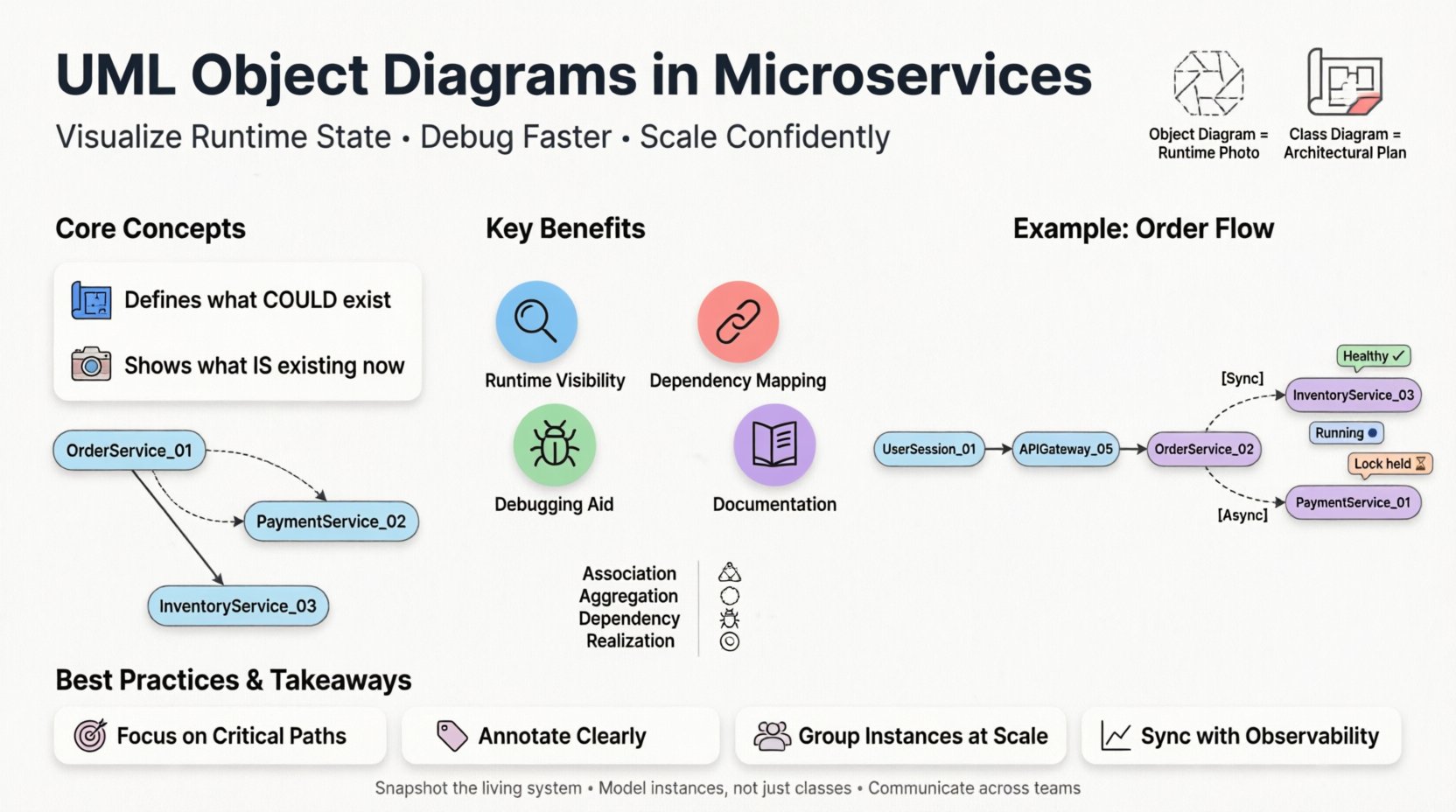
Before diving into microservices, one must distinguish between static and dynamic modeling. A class diagram acts as a blueprint. It shows what could exist. An object diagram shows what is existing right now. In a monolithic application, this distinction is manageable. In a microservices environment, the volume of active instances explodes.
Static vs. Dynamic Representation
- Class Diagram: Defines the contract. It specifies attributes, methods, and relationships for a service module.
- Object Diagram: Represents a snapshot. It shows specific instances of those services, their current property values, and active connections.
Think of a class diagram as the architectural plan for a house. The object diagram is a photograph of the house while people are living inside it, showing which lights are on and which doors are open.
🏗️ Microservices Context
Microservices break applications into loosely coupled, independently deployable units. Each unit, or service, can have multiple running instances. An object diagram helps visualize the topology of these instances.
Why Use Object Diagrams Here?
- Runtime State Visibility: Helps developers see how data flows between specific service instances during an operation.
- Dependency Mapping: Clarifies which service instance is calling which other instance.
- Debugging Aid: When a transaction fails, an object diagram can pinpoint the exact instance holding the error state.
- Documentation: Provides a static record of a specific deployment scenario or failure mode.
🔗 Modeling Relationships in Distributed Systems
In a monolith, objects live in the same memory space. In microservices, objects (or service instances) live in different network nodes. The relationships change significantly.
Association and Aggregation
Standard UML relationships still apply, but their implications differ.
- Association: Indicates a link between two service instances. For example, a Order Service Instance A is linked to a Inventory Service Instance B.
- Aggregation: A “has-a” relationship where the lifecycle is independent. A Gateway Instance aggregates requests from multiple Backend Instances.
- Composition: A strong “part-of” relationship. Rare in microservices due to independence, but useful for modeling data ownership where a Transaction Object cannot exist without its Parent Service Context.
Table: Relationship Types in Microservices
| Relationship | Meaning | Microservices Example |
|---|---|---|
| Association | Connection between instances | Client calls API Gateway |
| Aggregation | Weak ownership | Cache Service holds data for App Service |
| Dependency | One uses another | Notification Service depends on User Service |
| Realization | Interface implementation | Payment Service implements Payment Interface |
🖥️ Visualizing Service Instances
Creating an object diagram for microservices involves representing active instances rather than abstract classes. Each node in the diagram represents a running process or container.
Attributes of an Instance
When modeling a service instance, you must define what makes it unique at that moment.
- Instance ID: A unique identifier for the specific running process.
- State: Is the service Healthy, Starting, Stopping, or Error?
- Load: Current CPU or memory usage metrics (optional for high-level design).
- Configuration: Which environment settings are active (e.g., Production vs. Staging)?
Example Structure
Consider a simplified Order Processing System. An object diagram would show:
- OrderService_01: State = Running. Active Orders = 150.
- PaymentService_02: State = Running. Pending Transactions = 5.
- DatabaseInstance_A: State = Connected. Capacity = 80%.
Lines connecting these objects represent network calls or message queue subscriptions. This visualizes the actual traffic flow, not just the capability to flow.
🔄 Handling Dynamic State
The most significant challenge with object diagrams in microservices is volatility. Instances spin up and down rapidly. A snapshot today may be invalid tomorrow.
Static vs. Dynamic Snapshots
To manage this, distinguish between two types of object diagrams:
- Deployment Diagrams (Static): Shows the infrastructure. Servers, networks, and potential instances.
- Runtime Object Diagrams (Dynamic): Shows the active state during a specific transaction.
Use case: You are investigating a latency spike. You generate a runtime object diagram for the specific time window. You see Service X waiting on a lock held by Service Y. This is actionable intelligence.
📝 Data Models and Object States
Microservices often own their data. The object diagram helps visualize how data objects are distributed across services.
Domain Objects
Instead of a shared database, each service manages its own domain objects. An object diagram clarifies which service owns which data entity.
- User Object: Owned by Identity Service.
- Cart Object: Owned by Commerce Service.
- Invoice Object: Owned by Billing Service.
Relationships between these objects are often asynchronous. The object diagram should reflect this via dashed lines or specific annotations indicating eventual consistency.
Table: Data Ownership Patterns
| Pattern | Description | Diagram Representation |
|---|---|---|
| Database per Service | Each service has private DB | Separate object nodes for DBs |
| Shared Database | Multiple services access one DB | Multiple associations to one DB object |
| API Composition | Service A calls Service B for data | Dependency arrow from A to B |