


Project managers and team leaders often face the challenge of ensuring every team member knows their specific responsibilities. The Free RACI Matrix Tool from Visual Paradigm offers a powerful, web-based solution to eliminate ambiguity and streamline accountability. This tool allows you to create a clear, visual map of roles and tasks, ensuring everyone understands who is Responsible, Accountable, Consulted, and Informed. By using this interactive editor, you can define project phases, assign roles, and manage team details—all in one intuitive interface. This article provides a deep dive into how the tool works, focusing on the key features visible in the provided screenshots.
Key Takeaways
-
Visual Paradigm’s RACI Matrix Tool provides an interactive grid for defining roles and responsibilities.
-
Users can assign RACI (Responsible, Accountable, Consulted, Informed) roles to team members for each task.
-
The tool supports hierarchical role management and grouped tasks for complex project structures.
-
Team member details, including names and contact information, can be managed directly within the tool.
-
Projects can be saved locally as JSON files, ensuring data privacy and control.
Visualizing Roles and Responsibilities
The core of the RACI Matrix Tool is its interactive grid, which is clearly visible in:
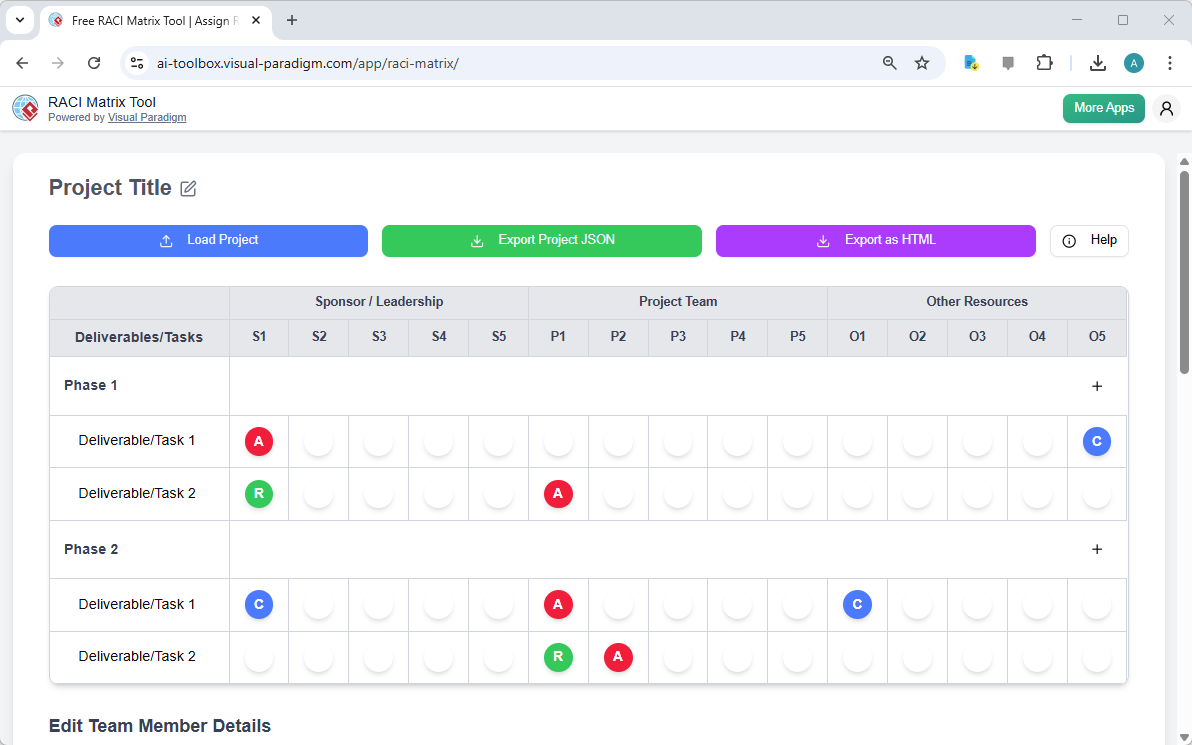
This interface allows users to define project deliverables or tasks as rows and various roles as columns. The role categories, such as “Sponsor / Leadership” and “Project Team,” are organized horizontally, while the deliverables are listed vertically. The tool’s design ensures that the matrix is both a planning tool and a living document, as changes made to the grid are instantly reflected in the team member details section.
Each cell at the intersection of a task and a role is a potential assignment point. The tool uses a simple color-coding system: a red circle with an ‘A’ indicates the person who is Accountable for that task, while a green circle with an ‘R’ signifies the person who is Responsible for doing the work. A blue circle with a ‘C’ means the person is Consulted, and a white circle indicates they are Informed. This visual language makes it easy to scan the matrix and quickly understand the project’s responsibility landscape. The ability to click on any cell to assign a role, as shown in the image, makes the process of populating the matrix both fast and intuitive.
Managing Team Member Details
For a RACI matrix to be truly effective, it must be grounded in real people. The second screenshot,
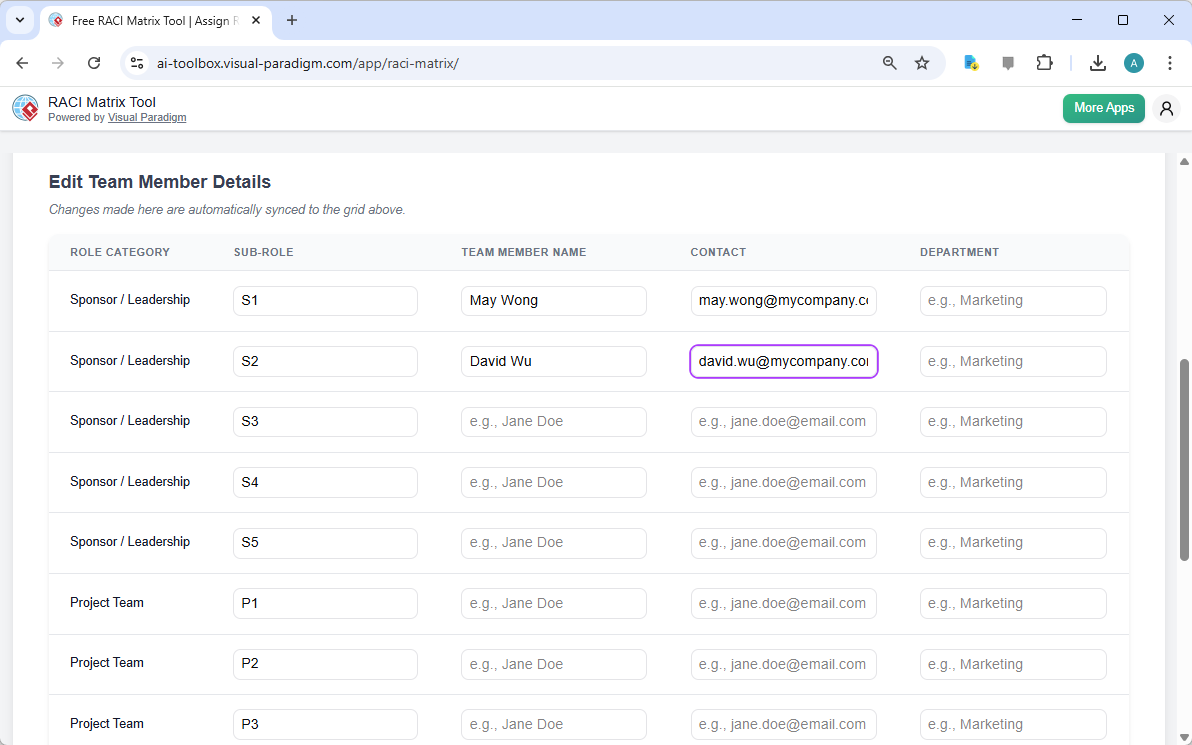
, shows the “Edit Team Member Details” section, which is a crucial part of the tool’s functionality. This section allows users to populate the sub-roles defined in the main grid with specific team members. For each sub-role, such as “S1” or “P1,” users can enter the team member’s name, contact email, and department. The image demonstrates how the tool automatically syncs these details with the grid above, meaning that when you see a red ‘A’ for a task, you can immediately see who that person is.
This level of personalization is vital for project onboarding and communication. Instead of a generic “Project Manager,” you can see that “May Wong” is the accountable person for a specific deliverable. This eliminates guesswork and ensures that the right person is contacted for any questions or updates. The ability to manage this information directly within the tool ensures that your RACI matrix is not just a theoretical document but a practical, up-to-date resource for your team.
Efficiency and Control in Project Management
One of the most significant benefits of this tool is its focus on user control and data privacy. As the screenshots show, the application is entirely web-based and runs in the user’s browser. There is no need to create an account or store your project data in the cloud. When you are ready to save your work, you can export your entire project as a JSON file, which is stored locally on your computer. This gives you full ownership of your data and ensures that sensitive project information remains private.
Furthermore, the tool’s design promotes efficiency. The ability to group tasks into phases, like “Phase 1” and “Phase 2,” helps to organize large projects into manageable chunks. The drag-and-drop functionality for reordering tasks ensures that the project flow is logical and easy to adjust. For stakeholders, the “Export as HTML” button provides a polished, professional report that can be easily shared, printed, or presented. This comprehensive approach makes the RACI Matrix Tool a powerful asset for any project manager looking to enhance clarity, accountability, and communication within their team.
For those looking to implement a structured approach to project responsibility, the Free RACI Matrix Tool from Visual Paradigm offers a straightforward, no-frills solution. It is a professional-grade tool designed to bring clarity to complex projects. To experience the power of this tool firsthand, you can try it now at https://ai-toolbox.visual-paradigm.com/app/raci-matrix/.
Related Links
Project management tools are essential for organizing project scope, tasks, and deliverables to ensure effective planning and execution. Visual Paradigm offers a comprehensive suite that includes Gantt charts, PERT charts, and Work Breakdown Structures (WBS) to track timelines and resources. These tools integrate with platforms like Jira and support structured PMBOK-aligned processes to improve team collaboration and project outcomes.
-
What Is Project Management? A Comprehensive Guide: This guide provides a clear overview of core project management principles, methodologies, and best practices.
-
Practical Guide to Gantt Charts: Master Project Planning & Scheduling: An in-depth resource for mastering Gantt charts to improve project planning and scheduling accuracy.
-
How to Use Work Breakdown Structure (WBS) in Project Management: A detailed tutorial on decomposing project scope into manageable tasks for better organization.
-
Project Management Guide-Through Process Tool: Details an automated tool that provides step-by-step guidance and templates in a centralized repository.
-
Visual Paradigm Jira Integration: Seamless Diagramming and Agile Workflow: Explains how to synchronize visual models directly with Jira to enhance project visibility and traceability.
-
Sprint Planning in Agile: Step-by-Step Guide: A practical guide focusing on backlog prioritization, task breakdown, and team alignment during sprints.
-
The Best PMBOK Tool: Visual Paradigm for Project Management Success: Highlights the benefits of using PMBOK-compliant software for efficient project delivery.
-
Pert Chart for Project Management – Cybermedian: Explores the application of PERT charts for estimating timelines and managing complex schedules.
-
Visual Paradigm Roadmap Tool – Plan and Track Product Development: A resource for building strategic roadmaps that align business goals with development milestones.
-
What is Agile Project Management?: An article defining Agile as a mindset for managing innovation and navigating project risks.